Project 4

Overview
Your job is to implement a memory manager using the buddy algorithm as described by Dr. Knuth in The Art of Computer Programming Volume 1 - Fundamental Algorithms. You will use the mmap() system call to get a large block of memory to manage. From there on, manage the chunk of memory returned by mmap using your own memory management functions.
Learning Outcomes
- 2.1 Demonstrate how low level memory is managed in user space
- 2.2 Explore the system call interface
- 3.1 Analyze a complex computing problem and apply principles of computing and other relevant disciplines to identify solutions.
Grading Rubric
Make sure and review the class grading rubric so you know how your project will be graded.
Task 1 - Setup
Follow the steps below to get your repository all set up and ready to use. The steps below show you how to use and set up GitHub Codespaces. You are not required to use Codespaces. All the steps below can be completed on Onyx (the CS lab machines) or on your personal machine if you prefer.
Create your repository from the template
The starter repository is a GitHub template, so you make your own copy of it instead of forking it.
- Open the starter repository: https://github.com/shanep/makefile-project-starter
- Click the green Use this template button and choose Create a new repository.
- Pick your personal GitHub account as the owner and name the repository cs452-p4.
- Click Create repository.
Your new repository is not a fork, so it has no upstream remote. That is on purpose: everything you need is already in your copy.
Start a new Codespace
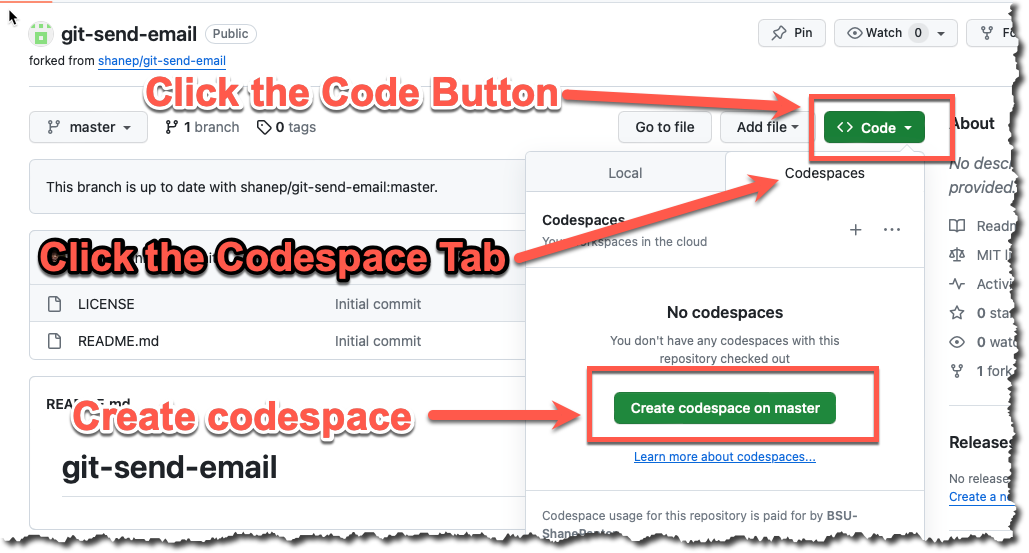
We will use GitHub Codespaces to do most of our coding. Codespaces is just VS Code in the cloud. This makes it really easy to set up a developer environment and code from any computer that has a browser and internet connection! From your new repository click Code, then the Codespaces tab, then Create codespace on master.
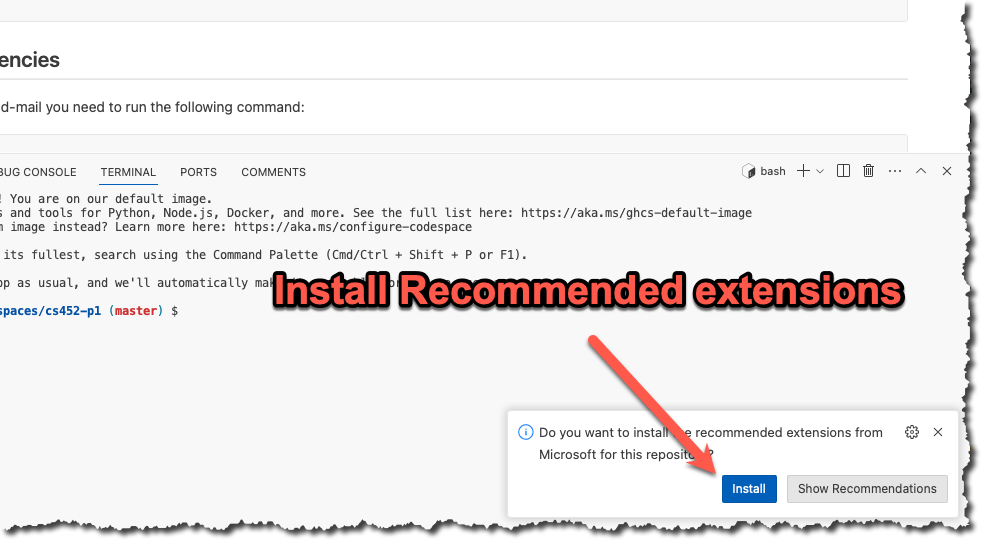
If you are asked to install recommended extensions, click "install". You may not be asked to install extensions if you are already syncing your account.
INFO
If you work on Onyx or your own machine instead, clone your repository with git clone and make sure you have gcc (or clang), make, and gcovr installed. The Codespace comes with all of these. The file docs/onyx.md in your repository has notes on using Onyx.
Get to know the starter
Here is what you get in the starter repository.
src/main.c- themainfunction for the executablesrc/lab.handsrc/lab.c- the library code that both the executable and the tests usetests/lab-test.c- your unit tests, written with the Unity test frameworktests/harness/- the Unity framework itself, don't edit these filesREADME.md- you will fill this out before you submitscripts/create-submission-report.shand.github/workflows/- continuous integration and the submission report
The Makefile builds every C file in src/ and tests/. The test build defines TEST, and src/main.c uses that to rename its main function so it does not clash with the main in tests/lab-test.c. Keep these lines at the top of src/main.c in every project.
#ifdef TEST
#define main main_exclude
#endif
These are the make targets you will use the most. Run make help to see them all.
| Command | What it does |
|---|---|
make all | Builds all four versions of the project listed below |
make check | Runs the unit tests in build/tests/myapp_t |
make leak | Runs the debug executable with Address Sanitizer leak checking on |
make leak-test | Runs the unit tests with Address Sanitizer leak checking on |
make report | Runs the unit tests and creates a code coverage report in build/report |
make clean | Deletes the build directory |
make all creates four programs.
build/release/myapp- the optimized executable, compiled with all the warning flagsbuild/debug/myapp_d- the executable compiled with Address Sanitizerbuild/tests/myapp_t- the unit tests compiled for code coveragebuild/debug-test/myapp_td- the unit tests compiled with Address Sanitizer
If there is no src/main.c then make all skips the executable and only builds the tests. That is how the projects that are 100% unit tests work.
WARNING
make check, make leak, make leak-test, and make report run whatever is already in build/. They do not recompile your code. Run make all after every change or you will be testing old code. Also, make all prints "Builds completed" even when one of the builds failed, so scroll up and read the output.
Task 2 - Prepare your repository
The starter repository is a bare bones template that you will need to update with the starter code below.
INFO
This project will be 100% unit tests. All your work will be done in src/lab.c and tests/lab-test.c, so delete the file src/main.c and the get_greeting function in src/lab.c. Without a src/main.c the make all command only builds the tests.
src/lab.h
#ifndef LAB_H
#define LAB_H

#include <stdlib.h>
#include <stdint.h>
#include <stdbool.h>


#ifdef __cplusplus
extern "C"
{
#endif
  /**
   * The default amount of memory that this memory manager will manage unless
   * explicitly set with buddy_init. The number of bytes is calculated as 2^DEFAULT_K
   */
#define DEFAULT_K 30

  /**
   * The minimum size of the buddy memory pool.
   */
#define MIN_K 20

  /**
   * The maximum size of the buddy memory pool. This is 1 larger than needed
   * to allow indexes 1-N instead of 0-N. Internally the maximum amount of
   * memory is MAX_K-1
   */
#define MAX_K 48

  /**
   * The smallest memory block size that can be returned by buddy_malloc value must
   * be large enough to account for the avail header.
   */
#define SMALLEST_K 6

#define BLOCK_AVAIL    1  /*Block is available to allocate*/
#define BLOCK_RESERVED 0  /*Block has been handed to user*/
#define BLOCK_UNUSED   3  /*Block is not used at all*/

  /**
   * Struct to represent the table of all available blocks do not reorder members
   * of this struct because internal calculations depend on the ordering.
   */
  struct avail
  {
    unsigned short int tag;     /*Tag for block status BLOCK_AVAIL, BLOCK_RESERVED, BLOCK_UNUSED*/
    unsigned short int kval;    /*The kval of this block*/
    struct avail *next;         /*next memory block*/
    struct avail *prev;         /*prev memory block*/
  };

  /**
   * The buddy memory pool.
   */
  struct buddy_pool
  {
    size_t kval_m;              /*The max kval of this pool*/
    size_t numbytes;            /*The number of bytes this pool is managing*/
    void *base;                 /*Base address used to scale memory for buddy calculations*/
    struct avail avail[MAX_K];  /*The array of available memory blocks*/
  };

  /**
   * Converts bytes to its equivalent K value defined as bytes <= 2^K
   * @param bytes The bytes needed
   * @return K The number of bytes expressed as 2^K
   */
  size_t btok(size_t bytes);


  /**
   * Find the buddy of a given pointer and kval relative to the base address we got from mmap
   * @param pool The memory pool to work on (needed for the base addresses)
   * @param buddy The memory block that we want to find the buddy for
   * @return A pointer to the buddy
   */
  struct avail *buddy_calc(struct buddy_pool *pool, struct avail *buddy);

  /**
   * Allocates a block of size bytes of memory, returning a pointer to
   * the beginning of the block. The content of the newly allocated block
   * of memory is not initialized, remaining with indeterminate values.
   *
   * If size is zero, the return value will be NULL
   * If pool is NULL, the return value will be NULL
   *
   * @param pool The memory pool to alloc from
   * @param size The size of the user requested memory block in bytes
   * @return A pointer to the memory block
   */
  void *buddy_malloc(struct buddy_pool *pool, size_t size);

  /**
   * A block of memory previously allocated by a call to buddy_malloc
   * or buddy_realloc is deallocated, making it available again
   * for further allocations.
   *
   * If ptr does not point to a block of memory allocated with
   * the above functions, it causes undefined behavior.
   *
   * If ptr is a null pointer, the function does nothing.
   * Notice that this function does not change the value of ptr itself,
   * hence it still points to the same (now invalid) location.
   *
   * @param pool The memory pool
   * @param ptr Pointer to the memory block to free
   */
  void buddy_free(struct buddy_pool *pool, void *ptr);

  /**
   * Changes the size of the memory block pointed to by ptr.
   * The function may move the memory block to a new location
   * (whose address is returned by the function).
   * The content of the memory block is preserved up to the
   * lesser of the new and old sizes, even if the block is
   * moved to a new location. If the new size is larger,
   * the value of the newly allocated portion is indeterminate.
   *
   * In case that ptr is a null pointer, the function behaves
   * like malloc, assigning a new block of size bytes and
   * returning a pointer to its beginning.
   *
   * if size is equal to zero, and ptr is not NULL, then the  call
   * is equivalent to free(ptr)
   *
   * @param pool The memory pool
   * @param ptr Pointer to a memory block
   * @param size The new size of the memory block
   * @return Pointer to the new memory block
   */
  void *buddy_realloc(struct buddy_pool *pool, void *ptr, size_t size);

  /**
   * Initialize a new memory pool using the buddy algorithm. Internally,
   * this function uses mmap to get a block of memory to manage so should be
   * portable to any system that implements mmap. This function will round
   * up to the nearest power of two. So if the user requests 503MiB
   * it will be rounded up to 512MiB.
   *
   * Note that if a 0 is passed as an argument then it initializes
   * the memory pool to be of the default size of DEFAULT_K. If the caller
   * specifies an unreasonably small size, then the buddy system may
   * not be able to satisfy any requests.
   *
   * NOTE: Memory pools returned by this function cannot be intermingled.
   * Calling buddy_malloc with pool A and then calling buddy_free with
   * pool B will result in undefined behavior.
   *
   * @param pool A pointer to the pool to initialize
   * @param size The size of the pool in bytes.
   */
  void buddy_init(struct buddy_pool *pool, size_t size);

  /**
   * Inverse of buddy_init.
   *
   * Notice that this function does not change the value of pool itself,
   * hence it still points to the same (now invalid) location.
   *
   * @param pool The memory pool to destroy
   */
  void buddy_destroy(struct buddy_pool *pool);

#ifdef __cplusplus
} //extern "C"
#endif

#endif
tests/lab-test.c
#include <assert.h>
#include <stdlib.h>
#include <time.h>
#ifdef __APPLE__
#include <sys/errno.h>
#else
#include <errno.h>
#endif
#include "harness/unity.h"
#include "../src/lab.h"


void setUp(void) {
  // set stuff up here
}

void tearDown(void) {
  // clean stuff up here
}


/**
 * Check the pool to ensure it is full.
 */
void check_buddy_pool_full(struct buddy_pool *pool)
{
  //A full pool should have all values 0-(kval-1) as empty
  for (size_t i = 0; i < pool->kval_m; i++)
    {
      assert(pool->avail[i].next == &pool->avail[i]);
      assert(pool->avail[i].prev == &pool->avail[i]);
      assert(pool->avail[i].tag == BLOCK_UNUSED);
      assert(pool->avail[i].kval == i);
    }

  //The avail array at kval should have the base block
  assert(pool->avail[pool->kval_m].next->tag == BLOCK_AVAIL);
  assert(pool->avail[pool->kval_m].next->next == &pool->avail[pool->kval_m]);
  assert(pool->avail[pool->kval_m].prev->prev == &pool->avail[pool->kval_m]);

  //Check to make sure the base address points to the starting pool
  //If this fails either buddy_init is wrong or we have corrupted the
  //buddy_pool struct.
  assert(pool->avail[pool->kval_m].next == pool->base);
}

/**
 * Check the pool to ensure it is empty.
 */
void check_buddy_pool_empty(struct buddy_pool *pool)
{
  //An empty pool should have all values 0-(kval) as empty
  for (size_t i = 0; i <= pool->kval_m; i++)
    {
      assert(pool->avail[i].next == &pool->avail[i]);
      assert(pool->avail[i].prev == &pool->avail[i]);
      assert(pool->avail[i].tag == BLOCK_UNUSED);
      assert(pool->avail[i].kval == i);
    }
}

/**
 * Test allocating 1 byte to make sure we split the blocks all the way down
 * to SMALLEST_K size. Then free the block and ensure we end up with a full
 * memory pool again
 */
void test_buddy_malloc_one_byte(void)
{
  fprintf(stderr, "->Test allocating and freeing 1 byte\n");
  struct buddy_pool pool;
  int kval = MIN_K;
  size_t size = UINT64_C(1) << kval;
  buddy_init(&pool, size);
  void *mem = buddy_malloc(&pool, 1);
  //Make sure correct kval was allocated
  buddy_free(&pool, mem);
  check_buddy_pool_full(&pool);
  buddy_destroy(&pool);
}

/**
 * Tests the allocation of one massive block that should consume the entire memory
 * pool and makes sure that after the pool is empty we correctly fail subsequent calls.
 */
void test_buddy_malloc_one_large(void)
{
  fprintf(stderr, "->Testing size that will consume entire memory pool\n");
  struct buddy_pool pool;
  size_t bytes = UINT64_C(1) << MIN_K;
  buddy_init(&pool, bytes);

  //Ask for an exact K value to be allocated. This test makes assumptions on
  //the internal details of buddy_init.
  size_t ask = bytes - sizeof(struct avail);
  void *mem = buddy_malloc(&pool, ask);
  assert(mem != NULL);

  //Move the pointer back and make sure we got what we expected
  struct avail *tmp = (struct avail *)mem - 1;
  assert(tmp->kval == MIN_K);
  assert(tmp->tag == BLOCK_RESERVED);
  check_buddy_pool_empty(&pool);

  //Verify that a call on an empty pool fails as expected and errno is set to ENOMEM.
  void *fail = buddy_malloc(&pool, 5);
  assert(fail == NULL);
  assert(errno == ENOMEM);

  //Free the memory and then check to make sure everything is OK
  buddy_free(&pool, mem);
  check_buddy_pool_full(&pool);
  buddy_destroy(&pool);
}

/**
 * Tests to make sure that the struct buddy_pool is correct and all fields
 * have been properly set kval_m, avail[kval_m], and base pointer after a
 * call to init
 */
void test_buddy_init(void)
{
  fprintf(stderr, "->Testing buddy init\n");
  //Loop through all kval MIN_k-DEFAULT_K and make sure we get the correct amount allocated.
  //We will check all the pointer offsets to ensure the pool is all configured correctly
  for (size_t i = MIN_K; i <= DEFAULT_K; i++)
    {
      size_t size = UINT64_C(1) << i;
      struct buddy_pool pool;
      buddy_init(&pool, size);
      check_buddy_pool_full(&pool);
      buddy_destroy(&pool);
    }
}


int main(void) {
  time_t t;
  unsigned seed = (unsigned)time(&t);
  fprintf(stderr, "Random seed:%u\n", seed);
  srand(seed);
  printf("Running memory tests.\n");

  UNITY_BEGIN();
  RUN_TEST(test_buddy_init);
  RUN_TEST(test_buddy_malloc_one_byte);
  RUN_TEST(test_buddy_malloc_one_large);
return UNITY_END();
}
Once you have updated all the starter code let's make your first commit so everything is saved. Open up a terminal and let's make a commit!
git add --all
git commit -m "Added in starter code"
Task 3 - Implement Buddy
Implement the Buddy Algorithm.
WARNING
You are NOT allowed to use any functions from the math library! You are required to use bit shifting and masking for your calculations. So this means no pow() or log2() functions should be found in your code.
Task 4 - Write Unit tests
Run make report to see your code coverage. Add enough tests beyond what the professor has given you to get as close to 100% coverage as possible.
Additional Resources
From the example in Knuth’s book we can calculate the buddy of a block of size 16. With the table below we know that a block of size 16 is K=4 so we will have 4 zeros at the right. Using the XOR operator we can calculate the buddy as follows:
   101110010110000
 ^ 000000000010000
------------------
   101110010100000
Knuth notation to C syntax quick reference
struct buddy_pool *pool;
struct avail *L;
| Knuth notation | C syntax |
|---|---|
| AVAILF[k] | pool->avail[k].next |
| AVAILB[k] | pool->avail[k].prev |
| LOC(AVAIL[k]) | &pool->avail[k] |
| LINKF(L) | L->next |
| LINKB(L) | L->prev |
| TAG(L) | L->tag |
| KVAL(L) | L->kval |
| buddyk(L) | buddy_calc(pool, L) |
Power of 2 quick reference
As specified in the algorithm in order for everything to work you must work in powers of two! This includes the address that you get back from mmap. You will need to scale the address appropriately or you will calculate invalid buddy values. You can use the table below for a quick reference for up to K=40.
| Power (k value) | Bytes | KiB/MiB/GiB/TiB |
|---|---|---|
| 0 | 1 | |
| 1 | 2 | |
| 2 | 4 | |
| 3 | 8 | |
| 4 | 16 | |
| 5 | 32 | |
| 6 | 64 | |
| 7 | 128 | |
| 8 | 256 | |
| 9 | 512 | |
| 10 | 1,024 | 1 KiB |
| 11 | 2,048 | 2 KiB |
| 12 | 4,096 | 4 KiB |
| 13 | 8,192 | 8 KiB |
| 14 | 16,384 | 16 KiB |
| 15 | 32,768 | 32 KiB |
| 16 | 65,536 | 64 KiB |
| 17 | 131,072 | 128 KiB |
| 18 | 262,144 | 256 KiB |
| 19 | 524,288 | 512 KiB |
| 20 | 1,048,576 | 1 MiB |
| 21 | 2,097,152 | 2 MiB |
| 22 | 4,194,304 | 4 MiB |
| 23 | 8,388,608 | 8 MiB |
| 24 | 16,777,216 | 16 MiB |
| 25 | 33,554,432 | 32 MiB |
| 26 | 67,108,864 | 64 MiB |
| 27 | 134,217,728 | 128 MiB |
| 28 | 268,435,456 | 256 MiB |
| 29 | 536,870,912 | 512 MiB |
| 30 | 1,073,741,824 | 1 GiB |
| 31 | 2,147,483,648 | 2 GiB |
| 32 | 4,294,967,296 | 4 GiB |
| 33 | 8,589,934,592 | 8 GiB |
| 34 | 17,179,869,184 | 16 GiB |
| 35 | 34,359,738,368 | 32 GiB |
| 36 | 68,719,476,736 | 64 GiB |
| 37 | 137,438,953,472 | 128 GiB |
| 38 | 274,877,906,944 | 256 GiB |
| 39 | 549,755,813,888 | 512 GiB |
| 40 | 1,099,511,627,776 | 1 TiB |
Hints
- There should be no hard coded constants in your code. You will need to use the macros defined in the C99 standard to get the correct width. For example to calculate a K value on a 64-bit system you would write
UINT64_C(1) << kvalNOT1 << kval - Remember to take into account the size of your header when calculating your K value. If a user asked for 32 bytes you will need to use K=6 not K=5 to account for the header size.
- If the memory cannot be allocated, then your buddy_malloc function should set errno to ENOMEM (which is defined in errno.h header file) and return NULL.
- You can’t use malloc/free/realloc/calloc from the C standard library.
- You will need to make extensive use of pointer arithmetic! When you are dealing with raw (untyped) memory make sure and cast the pointer to the correct type so it is moved the correct amount.
- Be mindful of the differences between
sizeof(struct foo)andsizeof(struct foo*). The first instance gives you the size of the struct while the second gives you the size of a pointer. If the size of the struct just happens to be the same as a pointer your code will appear to work until you either add a new member tofooOR you move to a system where the sizes of pointers are different. For example moving from a 64-bit system to a 32-bit system or vice versa! - Read Chapter 14 - Interlude: Memory API
Extra Fun Reading
Debugging Raw memory
In the C programming language we can allocate a chunk of memory on the heap and treat that chunk of memory as an array. If you are working on debugging a problem and want to inspect the contents of the array using the GUI debugger interface in VSCode you may have to tell the debugger (with a cast) that a pointer is actually pointing to a dynamically allocated array not a single variable. This example walks through how to display a pointer as an array that is embedded within a struct.
More reading about C and GDB.
Consider the struct declaration demo_pool shown below. It is similar to the buddy_pool struct in lab.h, except the avail member is a pointer that we must dynamically allocate instead of a fixed size array. We want to display avail in the debugger as an array. We allocate a demo_pool struct and then dynamically allocate the avail array using malloc.
struct demo_pool
{
    size_t kval_m;
    uintptr_t base;
    struct avail *avail; /*pointer to the start of the avail array*/
};

struct demo_pool *pool = malloc(sizeof(struct demo_pool));
pool->kval_m = 9;
pool->base = 0;
pool->avail = malloc(sizeof(struct avail) * 9);
If we run the debugger we will see the variable pool with the element avail is displayed as a single variable not an array of 9 structs as we expected.
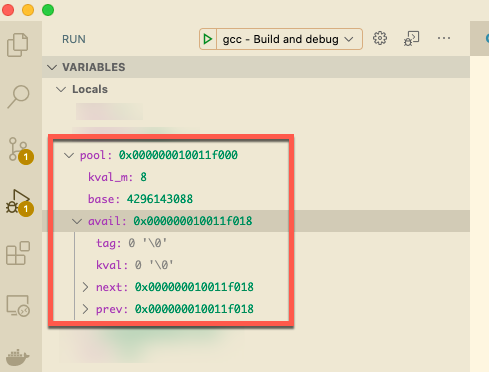
The element avail is just a pointer to the memory address of the first element and the debugger can’t determine the size of the array and thus will display it as a single struct instead of an array as expected.
Fortunately, all is not lost! Most debuggers allow you to set a watch on a memory location and you can force the debugger to cast the memory to a certain type. Both gdb and lldb have specific commands to display a memory block as an array. However, using casting works regardless of what debugger you are using.
If we add a new watch on a variable and then force the debugger to display the memory block as an array instead of a single variable we can easily inspect the data and track down any issues you are experiencing.
(struct avail(*) [9])pool->avail

For a plain old dynamic array you can add a watch expression that is set to the desired type.
*(int(*)[10])A
Final Task - Submit your code
Now that you have completed all the tasks, the only thing left to do is to create a submission report and upload it to Canvas so you can receive a grade for all your hard work.
Update your README
Open up README.md and fill in every section.
- Your name, email, and class section at the top
- Known Bugs or Issues - anything that does not work
- Experience - your struggles and breakthroughs with the project
- Analysis - only if the project asks for one, otherwise delete the section
Check your build
Run the same commands that the continuous integration (CI) workflow runs and make sure you get a clean build with no warnings, all tests passing, and no Address Sanitizer errors.
make clean
make all
make check
make leak-test
Then run make report and look at the coverage numbers at the bottom of the output. The grading rubric explains how coverage is graded.
Push and check CI
Commit and push all your work.
git add --all
git commit -m "Finished the project"
git push
Open your repository on GitHub, click the Actions tab, then Continuous Integration (CI), and confirm that the run for your last push is green. If it is not, open the run, read the output, and fix the problem.
Create the submission report
- In the Actions tab click Create Submission Report Via GitHub Action.
- Click Run workflow and run it on the
masterbranch. - Wait for the run to finish and then refresh your repository. You will now have a file named
submission-report.docxthat contains your README, the build output, the test results, the coverage report, the Address Sanitizer report, and all your code. - The workflow added a commit to your repository, so run
git pullin your Codespace (or wherever you cloned the repository) before you make any more changes. If you skip this, your next push will be rejected.
DANGER
Do NOT edit the generated report. The report ends with a hash of its contents and any changes will be reported as academic dishonesty. If something in the report is wrong, fix your code, push, and run the workflow again.
GitHub Actions is down
If GitHub Actions is down, or the workflow hangs for more than 5 minutes, you can generate the report on Onyx instead. Follow the steps in docs/onyx.md in your repository, which install gcovr and run scripts/create-submission-report.sh.
Submitting
Download submission-report.docx from GitHub and submit it to Canvas. You can view your own submission in Canvas, so open it and make sure everything looks right. Your grade will be updated after the due date (and late window) has passed.