Chapter 16: Web & Mobile Security
Authors: Sascha Fahl (Leibniz University Hannover)
About this page
This chapter is from CyBOK Version 1.2.0, © Crown Copyright, The National Cyber Security Centre 2026, licensed under the Open Government Licence. It was converted from the PDF into a web page so that it works with screen readers and other assistive technology. Each abbreviation is spelled out in square brackets the first time it appears, and those meanings are ours, not the book's. So are the names of links the book prints as a bare web address. The PDF (Portable Document Format) is the original, so if the two disagree, the PDF wins.
16.1 Introduction
The purpose of this Knowledge Area is to provide an overview of security mechanisms, attacks and defences in modern web and mobile ecosystems. This overview is intended for use in academic courses and to guide industry professionals interested in this area.
Web and mobile security have become the primary means through which many users interact with the Internet and computing systems. Hence, their impact on overall information security is significant due to the sheer prevalence of web and mobile applications (apps). Covering both web and mobile security, this Knowledge Area emphasises the intersection of their security mechanisms, vulnerabilities and mitigations. Both areas share a lot in common and have experienced a rapid evolution in the features and functionalities offered by their client side applications (apps). This phenomenon, sometimes called appification, is a driver in modern web and mobile ecosystems. Web and mobile client apps typically interact with server side application interfaces using web technologies. This second phenomenon, also sometimes called webification, equally affects both web and mobile ecosystems. In the 1990s, web and mobile security had a strong focus on server-side and infrastructure security. Web browsers were mostly used to render and display static websites without dynamic content. The focus on the server-side prevailed even with the rise of early scripting languages such as Perl and PHP [PHP: Hypertext Preprocessor]. However, web content became more dynamic in the 2000s, and server-side security had to address injection attacks. Similarly to web browsers, early mobile devices had limited functionality and were mostly used to make calls or send SMS [Short Message Service]. Mobile security back then focused on access control, calls and SMS security.
The rise of modern web and mobile platforms brought notable changes. A significant amount of web application code is no longer executed on the server-side but runs in the browser. Web browser support for Java, Adobe Flash, JavaScript and browser plugins and extensions brought many new features to the client, which prompted a drastic change of the attack surface on the web. New types of attacks such as Cross-Site Scripting emerged and plugins proved to be vulnerable, e.g. Adobe Flash browser plugins are known for being an attractive target for attackers. In response to these new threats, browser vendors and website developers and operators took measures. For instance, Google Chrome disabled the Adobe Flash plugin by default in 2019 [1465] and new security best practices were developed [1466]. Similarly to web browsers, mobile devices became smarter and more feature-rich. Smartphones and tablets are equipped with sensors, including motion, GPS [Global Positioning System] and cameras. They have extensive computing power, storage capacity and are connected to the Internet 24-7. Modern Android and iOS devices run full-blown operating systems and increasingly feature-rich and complex application frameworks. Mobile apps can request access to all the devices’ resources and sensors using permission based access control, and process highly sensitive user information. Being powerful, feature-rich, and connected makes mobile clients promising and attractive targets for attackers.
Modern web and mobile ecosystems are the primary drivers for the rise of appification and the "there is an app for everything" motto sums up many of the technological and security developments in recent years. The appification trend resulted in millions of apps ranging from simple flashlight apps to online social network apps, from online banking apps to mobile and browser-based games. It also sparked the merging of technologies and security mechanisms used in web and mobile applications. Both ecosystems are typically client-server oriented. Web browsers and mobile apps communicate with back-end services often using web focused technologies. Communication is mostly based on the Hypertext Transfer Protocol (HTTP) and its secure extension HTTPS [Hypertext Transfer Protocol Secure]. Both web-browsers and mobile applications tend to primarily exchange Hypertext Markup Language (HTML), JSON [JavaScript Object Notation] and XML [Extensible Markup Language] documents and both make extensive use of the JavaScript programming language, on the server- and the client-side. Webification describes the conversion to these web technologies.
The sheer amount of applications in modern web and mobile ecosystems also impacted the software distribution model, which moved away from website downloads to centralised application stores, which allow developers to publish, advertise and distribute their software, and users to download new apps and app updates. The centralised software distribution had a positive impact on update frequencies and speed for both web and mobile.
This Knowledge Area focuses on the appification trend and an introduction to the core technologies of the webification phenomenon. Figure 16.1 provides an overview of the entities involved and their interactions.
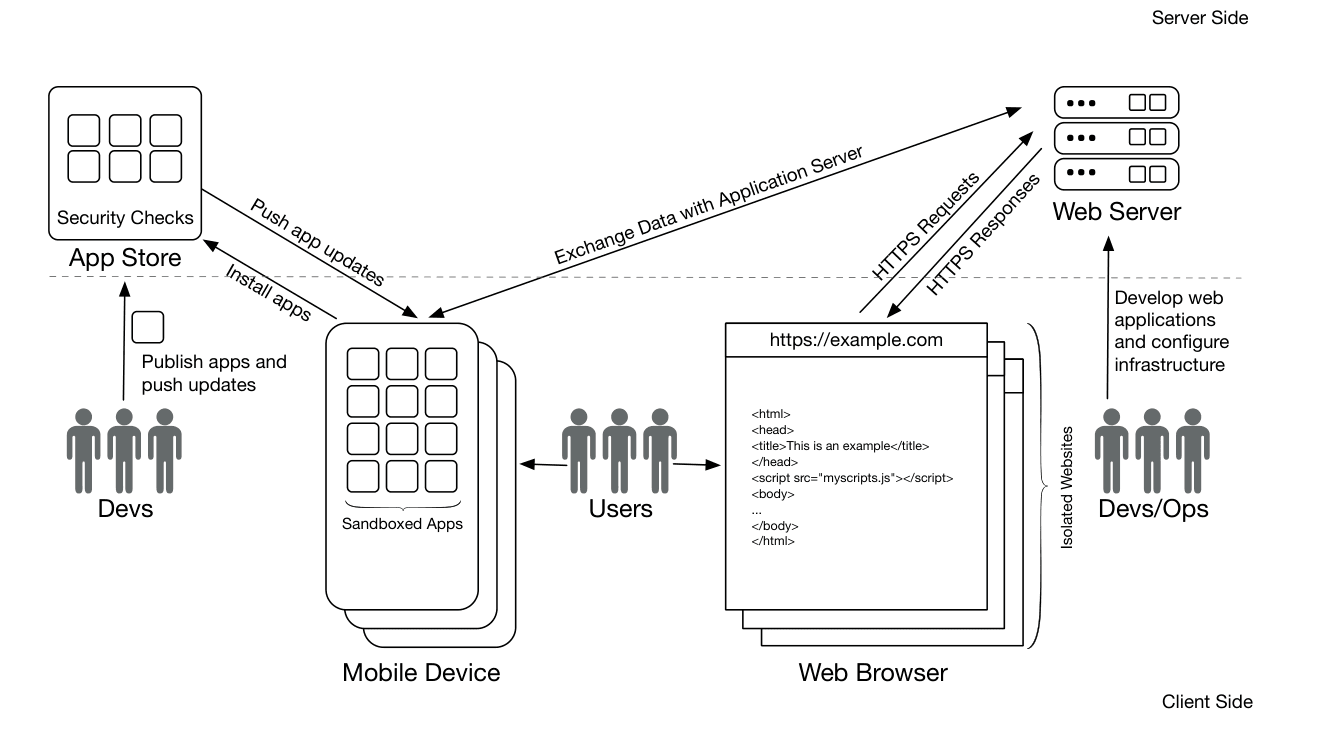
Figure 16.1: Web and Mobile Ecosystem
Text description of Figure 16.1
A block diagram with icons and labelled arrows. A dashed horizontal line separates the upper part, labelled "Server Side" (top right corner), from the lower part, labelled "Client Side" (bottom right corner). The App Store and the Web Server sit on the dashed line's upper side; the Mobile Device and the Web Browser sit below it.
Elements:
App Store: a box containing a grid of six app icons and the label "Security Checks".
Web Server: a stack of three server units.
Mobile Device: a stack of three phones, each showing a grid of app icons, with the brace label "Sandboxed Apps".
Web Browser: a stack of three browser windows. The front window shows the address "
https://example.com" and this page source:html<html> <head> <title>This is an example</title> </head> <script src="myscripts.js"></script> <body> ... </body> </html>A brace at the right of the windows is labelled "Isolated Websites".
Three groups of three people icons: "Devs" (below the App Store), "Users" (between the Mobile Device and the Web Browser) and "Devs/Ops" (below the Web Server, at the right edge).
Arrows:
- Devs to App Store: "Publish apps and push updates".
- App Store to Mobile Device: "Push app updates".
- Mobile Device to App Store: "Install apps".
- Mobile Device and Web Server, with an arrowhead at each end: "Exchange Data with Application Server".
- Web Browser to Web Server: "HTTPS Requests".
- Web Server to Web Browser: "HTTPS Responses".
- Users and Mobile Device, with an arrowhead at each end (no label).
- Users and Web Browser, with an arrowhead at each end (no label).
- Devs/Ops to Web Server: "Develop web applications and configure infrastructure".
After introducing core technologies and concepts, we describe important security mechanisms and illustrate how they differ from non-web and non-mobile ecosystems. Software and content isolation are crucial security mechanisms and aim to protect apps and websites from malicious access. While isolation is understood in relation to traditional operating systems (cf. the Operating Systems & Virtualisation Security Knowledge Area (Chapter 11)), specifics for web and mobile platforms will be outlined.
Modern web and mobile platforms introduced new forms of access control based on permission dialogues. Whilst a more general discussion of access control is included in the Authentication, Authorisation & Accountability Knowledge Area (Chapter 14), this Knowledge Area discusses web and mobile specifics. Web and mobile applications make extensive use of the HTTP and HTTPS protocols. Hence, we will discuss the Web Public Key Infrastructure (PKI) and HTTPS extending the Transport Layer Security (TLS) section in the Network Security Knowledge Area (Section 19.3.2). Similarly, we will discuss web and mobile-specific authentication aspects, referring readers to the Authentication, Authorisation & Accountability Knowledge Area (Chapter 14) for a more general discussion of authentication. Finally, we address frequent software updates as a crucial security measure. While software updates are equally important in traditional computer systems, the centralisation[1] of web and mobile ecosystems, introduces new challenges and opportunities.
The following sections focus on web and mobile-specific client and server-side security aspects. However, we will not address common software vulnerabilities (cf. the Software Security Knowledge Area (Chapter 15)) and operating system security (cf. Operating Systems & Virtualisation Security Knowledge Area (Chapter 11)) in general. Section 16.3 first covers phishing and clickjacking attacks and defenses. Both affect web and mobile clients and exploit human difficulties in correctly parsing URLs [Uniform Resource Locator] or identifying changes in the visual appearance of web-sites. As feature-rich web and mobile clients store sensitive data, we will then discuss client-side storage security issues and mitigations. Finally, Section 16.3 discusses physical attacks on mobile clients, including smudge attacks and shoulder surfing. Section 16.4 addresses server-side challenges, starting with an overview of frequent injection attacks. We discuss SQL [Structured Query Language] and command injection attacks that allow malicious users to manipulate database queries to storage backends of web applications and commands that are executed. This is followed by a discussion of cross-site scripting and cross-site request forgery attacks and common server-side misconfigurations that might lead to vulnerable service backends.
Overall, the discussion of client- and server-side security challenges aims to serve as the underlining of the natural split between entities in web and mobile ecosystems. Additionally, the chosen aspects illustrate the difference between the web and mobile world from other ecosystems.
Due to its focus on the intersection of both web and mobile security, this Knowledge Area does not cover aspects that are unique to either web or mobile such as mobile device security, mobile network (i. e., 2G/3G/4G/5G) security (see Physical Layer & Telecommunications Security Knowledge Area (Chapter 22)), and mobile malware. Some of these aspects are discussed in the Hardware Security Knowledge Area (Chapter 20), the Malware & Attack Technologies Knowledge Area (Chapter 6) and the Network Security Knowledge Area (Chapter 19). We also do not discuss side-channel attacks; the concept and examples for side-channel security are given in the Hardware Security Knowledge Area (Chapter 20).
16.2 Fundamental Concepts and Approaches
This section describes fundamental concepts and approaches of modern web and mobile platforms that affect security. The information presented in this section is intended to serve as a foundation to better understand the security challenges in the following sections. Similar to other software products and computer systems, mobile operating systems and applications and web browsers as well as web servers may contain exploitable bugs. General purpose software vulnerabilities are discussed in the Software Security Knowledge Area (Chapter 15).
16.2.1 Appification
Over the last ten years, the rise of mobile devices and ubiquitous Internet access have changed the way software is produced, distributed and consumed, altering how humans interact with computer devices and with software installed on the devices. While regular Internet browsers have been the dominant way of accessing content on the web in the pre-mobile era, the concept of appification significantly changed the way users access content online [1468]. Appification describes the phenomenon of moving away from a web-based platform to access most digital tools and media online with a web-browser through mobile applications with highly specialised, tiny feature sets. As mobile devices grew to become the primary interface for web access worldwide [1475], the number of apps rose enormously over the last decade. “There is an app for everything” became the mantra of appified software ecosystems, which produced numerous applications for all sorts of use cases and application areas. Many apps look like native local desktop or mobile applications. However, they are often (mobile) web applications that communicate with back end services, which then outsource computation and storage tasks to the client. The shift towards appification had a significant impact on web and mobile security creating more security challenges on the client-side. The rise of appification also impacted the developer landscape. In the pre-appification era, software development was mostly dominated by experienced developers. Due to the more extensive tool and framework support, the market entrance barrier is lower in appified ecosystems. This attracts more inexperienced developers, and has negative consequences for web and mobile security in general (cf. the Human Factors Knowledge Area (Chapter 4)).
The Rise of the Citizen Developer The appification trend attracts many non-professional software developers called citizen developers. Many of them do not have a software engineering education but make use of multiple simple APIs [Application Programming Interface] and tools available to build apps for different platforms. Oltrogge et al. [1476] found that the adoption of easy-to-use Online Application Generators (OAGs) to develop, distribute and maintain apps has a negative impact on application security. Generated apps tend to be vulnerable to reconfiguration and code injection attacks and rely on an insecure infrastructure.
16.2.2 Webification
Modern web and mobile platforms gave rise to another phenomenon. Many of the applications are not native applications written in compiled programming languages such as Java or Kotlin and C/C++ (e. g. for Android apps) or Objective-C and Swift (e. g. for iOS apps). Instead, they are based on web technologies including server-side Python, Ruby, Java or JavaScript scripts and client-side JavaScript. In addition to conventional web applications targeting regular web browsers, mobile web applications are more frequently built using these web technologies. In particular, mobile web applications make heavy use of the JavaScript language.
This section gives a brief introduction to the most essential technologies needed to explain vulnerabilities and mitigations later in the KA [Knowledge Area]. We include Uniform Resource Locators (URLs), the Hypertext Transfer Protocol (HTTP), the Hypertext Markup Language (HTML), Cascading Style Sheets (CSS) and the JavaScript programming language. For more detailed information, we suggest reading [1477].
16.2.2.1 Uniform Resource Locators
Uniform Resource Locators (URLs) [1469] are a core concept in the web. A URL is a well-formed and fully qualified text string that addresses and identifies a resource on a server. Address bars in modern browser User Interfaces (UIs) use the URLs to illustrate the remote address of a rendered document. A fully qualified absolute URL string consists of several segments and contains all the required information to access a particular resource. The syntax of an absolute URL is: scheme://credentials@host:port/resourcepath?query_parameters#fragments. Each segment has a particular meaning (cf. Table 16.1).
Table 16.1: URL segments.
| Segment | Optional | Description |
|---|---|---|
| scheme: | No | Indicates the protocol a web client should use to retrieve a resource. Common protocols in the web are http: and https: |
| // | No | Indicates a hierarchical URL as required by [1469] |
| credentials@ | Yes | Can contain a username and password that might be needed to retrieve a resource from a remote server. |
| host | No | Specifies a case-insensitive DNS [Domain Name System] name (e. g. cybok.org), a raw IPv4 (e. g. 127.0.0.1) or IPv6 address (e. g. [0:0:0:0:0:0:0:1]) to indicate the location of the server hosting a resource. |
| :port | Yes | Describes a non-default network port number to connect to a remote server. Default ports are 80 for HTTP and 443 for HTTPS. |
| /resourcepath | No | Identifies the resource address on a remote server. The resource path format is built on top of Unix directory semantics. |
| ?query_parameters | Yes | Passes non-hierarchical parameters to a remote resource, such as server-side script input parameters. |
| #fragment | Yes | Provides instructions for the browser. In practice, it is used to address an HTML anchor element for in-document navigation. |
16.2.2.2 Hypertext Transfer Protocol
The Hypertext Transfer Protocol (HTTP) is the most widely used mechanism to exchange documents between servers and clients on the web. While HTTP is mostly used to transfer HTML documents, it can be used for any data. Although HTTP/2.0 [1478] is the newest protocol revision, the most widely supported protocol version is HTTP/1.1 [1467]. HTTP is a text-based protocol using TCP/IP. An HTTP client initiates a session by sending an HTTP request to an HTTP server. The server returns an HTTP response with the requested file.
The first line of a client request includes HTTP version information (e. g. HTTP/1.1). The remaining request header consists of zero or more name:value pairs. The pairs are separated by a new line. Common request headers are User-Agent – these include browser information, Host – the URL hostname, Accept – which carries all supported document types, Content-Length – the length of the entire request and Cookie – see Section 16.2.8. The request header is terminated with a single empty line. HTTP clients may pass any additional content to the server. Although the content can be of any type, clients commonly send HTML content to the server, e. g. to submit form data. The HTTP server responds to the request with a response header followed by the requested content. The response header contains the supported protocol version, a numerical status code, and an optional, human-readable status message. The status notification is used to indicate request success (e. g. status 200), error conditions (e. g. status 404 or 500) or other exceptional events. Response headers might also contain Cookie headers – cf. Section 16.2.8. Additional response header lines are optional. The header ends with a single empty line followed by the actual content of the requested resource. Similar to the request content, the content may be of any type but is often an HTML document.
Although cookies were not part of the original HTTP RFC [Request For Comments] [1467], they are one of the most important protocol extensions. Cookies allow remote servers to store multiple name=value pairs in client storage. Servers can set cookies by sending a Set-Cookie: name=value response header and consume them by reading a client’s Cookie: name=value request header. Cookies are a popular mechanism to maintain sessions between clients and servers and to authenticate users.
HTTP is request-response based and neatly fits unidirectional data transfer use cases. However, for better latency and more effective use of bandwidth, bidirectional network connections are needed. Bidirectional connections not only allow clients to pull data from the server, but also the server to push data to the client at any time. Therefore, the WebSocket protocol [1479] provides a mechanism on top of HTTP. WebSocket connections start with a regular HTTP request that includes an Upgrade: WebSocket header. After the WebSocket handshake is completed, both parties can send data at any time without having to run a new handshake.
16.2.2.3 Hypertext Markup Language
The Hypertext Markup Language (HTML) [1470] is the most widely used method to produce and consume documents on the web. The most recent version is HTML5 [HyperText Markup Language 5]. The HTML syntax is fairly straightforward: a hierarchical tree structure of tags, name=value tag parameters and text nodes form an HTML document. The Document Object Model (DOM) defines the logical structure of an HTML document and rules how it is accessed and manipulated. However, competing web browser vendors introduced all sorts of custom features and modified the HTML language to their wishes. The many different and divergent browser implementations resulted in only a small portion of the websites on the Internet adhering to the HTML standard’s syntax. Hence, implementations of HTML parsing modes and error recovery vary greatly between different browsers.
The HTML syntax comes with some constraints on what may be included in a parameter value or inside a text node. Some characters (e. g., angle brackets, single and double quotes and ampersands) make the blocks of the HTML markup. Whenever they are used for a different purpose, such as parts of substrings of a text, they need to be escaped. To avoid undesirable side effects, HTML provides an entity encoding scheme. However, the failure to properly apply the encoding to reserved characters when displaying user-controlled information may lead to severe web security flaws such as cross-site scripting (cf. Section 16.4).
16.2.2.4 Cascading Style Sheets
Cascading Style Sheets (CSS) [1480] are a consistent and flexible mechanism to manipulate the appearance of HTML documents. The primary goal of CSS was to provide a straightforward and simple text-based description language to supersede the many vendor-specific HTML tag parameters that lead to many inconsistencies. However, similar to divergent HTML parsing implementations, different browsers also implement different CSS parsing behavior. CSS allows HTML tags to be scaled, positioned or decorated without being limited by the original HTML markup constraints. Similar to HTML tag values, values inside CSS can be user-controlled or provided externally, which makes CSS crucial for web security.
16.2.2.5 JavaScript
JavaScript [1471] is a simple yet powerful object-oriented programming language for the web. It runs both client-side in web browsers and server-side as part of web applications. The language is meant to be interpreted at runtime and has a C-inspired syntax. JavaScript supports a classless object model, provides automatic garbage collection and weak and dynamic typing. Client-side JavaScript does not support I/O mechanisms out of the box. Instead, some limited predefined interfaces are provided by native code inside the browser. Server-side JavaScript (e. g., Node.js [1481]) supports a wide variety of I/O mechanisms, e. g., network and file access. The following discussion will focus on client JavaScript in web browsers. Every HTML document in a browser is given its JavaScript execution context. All scripts in a document context share the same sandbox (cf. Section 16.2.4). Inter-context communication between scripts is supported through browser-specific APIs. However, execution contexts are strictly isolated from each other in general. All JavaScript blocks in a context are executed individually and in a well-defined order. Script processing consists of three phases:
Parsing validates the script syntax and translates it to an intermediate binary representation for performance reasons. The code has no effect until parsing is completed. Blocks with syntax errors are ignored, and the next block is parsed.
Function Resolution registers all named, global functions the parser found in a block. All registered functions can be reached from the following code.
Execution runs all code statements outside of function blocks. However, exceptions may still lead to execution failures.
While JavaScript is a very powerful and elegant scripting language, it brings up new challenges and security issues such as Cross-Site Scripting vulnerabilities (cf. Section 16.4.1).
16.2.2.6 WebAssembly
WebAssembly (Wasm) [1482] is an efficient and fast binary instruction format and is supported by most modern browser vendors. It is a stack-based virtual machine language and mainly aims to execute at native speed on client machines. Code written in WebAssembly is memory safe and benefits from all security features provided by regular code associated with a website. WebAssembly code is sandboxed, enforces the same origin policy (cf. Section 16.2.4) and is limited to the resources provided by the corresponding website’s permissions. Additionally, WebAssembly code can access JavaScript code running in the same origin container and provide its functionality to JavaScript code from the same origin.
16.2.2.7 WebViews
WebViews are a further trend in webification and mobile apps. They allow the easy integration of web content into mobile apps [1483]. Developers can integrate apps with HTML and JavaScript and benefit from portability advantages. WebViews run in the context of regular mobile apps and allow a rich two-way interaction with the hosted web content. Mobile apps can invoke JavaScript from within the web content, and monitor and intercept events in the web content. At the same time, specific JavaScript APIs allow WebView apps to interact with content and sensors outside the WebView context. The interaction of web content with native app content raises new security concerns and enables both app-to-web and web-to-app attacks [1484–1486]. App-to-web attacks, allow malicious apps to inject JavaScript into hosted WebViews with the goal to exfiltrate sensitive information or trick WebViews into navigating to and presenting users with untrusted and potentially malicious websites. Web-to-app attacks inject untrusted web content into an app and leverage an app’s JavaScript bridge to the underlying host app. The goal of a web-to-app attack is privilege escalation to the level of its hosting app’s process.
Both the appification and webification phenomena led to a new way of software distribution. Instead of decentralised download sources, centralised application stores which are illustrated in the next section emerged.
16.2.3 Application Stores
Application stores are centralised digital distribution platforms that organise the management and distribution of software in many web and mobile ecosystems. Famous examples are the Chrome web store for extensions for the Chrome browser, Apple’s AppStore for iOS applications, and Google Play for Android applications. Users can browse, download, rate and review mobile applications or browser plugins and extensions. Developers can upload their software to application stores that manage all of the software distribution challenges, including the provision of storage, bandwidth and parts of the advertisement and sales. Before publication, most application stores deploy application approval processes for testing reliability, adherence to store policies, and for security vetting [1487, 1488].
Most of the software available in ecosystems that have application stores is distributed through the stores. Only a few users side-load software (i. e. install software from other sources than the store). Application stores allow providers to control which applications are available in their stores, which allows them to ban particular applications. Whilst this can give rise to accusations of censorship, the deployment of security vetting techniques has helped to significantly reduce the amount of malicious software available in stores [1487] and to reduce the number of applications that suffer from vulnerabilities due to the misuse of security APIs by developers [398]. Deployed security vetting techniques include static and dynamic analysis applied to application binaries and running instances of applications. In addition to security vetting techniques, application stores require applications to be signed by developer or application store keys. In Android, application signing does not rely on the same public key infrastructures used on the web. Instead, developers are encouraged to use self-signed certificates and required to sign application updates with the same key to prevent malicious updates [1489]. The application signing procedure on iOS devices requires apps to be signed by Apple. Unsigned apps cannot be installed on iOS devices. Application stores not only allow developers and users centralised access to software publication, distribution and download, they also enable users to rate and review published applications. User rating and reviews are intended to help other users make more informed download decisions, but they also have a direct connection to application security.
Impact of User Ratings and Reviews on Application Security Nguyen et al. [1490] conducted a large-scale analysis of user reviews for Android applications and their impact on security patches. They found that the presence of security- and privacy-related user reviews for applications are contributing factors to future security-related application updates.
16.2.4 Sandboxing
Both modern mobile and browser platforms make use of different sandboxing techniques to isolate applications and websites and their content from each other (cf. Operating Systems & Virtualisation Security Knowledge Area (Chapter 11)) [1491, 1492]. This also aims to protect the platform against malicious applications and sites. Major web browsers (e.g. Google Chrome [1493]) and mobile platforms (e.g. Android [1494]) implement isolation at an operating system process level. Each application or website runs in its own process [2]. By default, isolated processes cannot interact with each other and cannot share resources. In browsers, site isolation serves as a second line of defence as an extension to the same-origin-policy (cf. Section 16.2.4.2).
16.2.4.1 Application Isolation
Modern mobile platforms provide each application with their sandbox running in a dedicated process and their own file-system storage. Mobile platforms take advantage of underlying operating system process protection mechanisms for application resource identification and isolation. For example, application sandboxes in Android [1494] are set-up at kernel-level. Security is enforced through standard operating system facilities, including user and group IDs [identifier] as well as security contexts. By default, sandboxing prevents applications from accessing each other and only allows limited access to operating system resources. To access protected app and operating system resources inter-app communication through controlled interfaces is required.
16.2.4.2 Content Isolation
Content isolation is one of the major security assurances in modern browsers. The main idea is to isolate documents based on their origin so that they cannot interfere with each other. The Same-Origin Policy (SOP) [1495] was introduced in 1995 and affects JavaScript and its interaction with a document’s DOM, network requests and local storage (e. g., cookies). The core idea behind SOP is that two separate JavaScript execution contexts are only allowed to manipulate a document’s DOM if there is an exact match between the document host and the protocol, DNS name and port numbers[3]. Cross-origin manipulation requests are not allowed. Table 16.2 illustrates sample SOP validation results. Similar to JavaScript-DOM-interaction, the SOP limits the JavaScript XMLHttpRequest capabilities to only issue HTTP requests to the origin of the host document.
Table 16.2: SOP validation examples.
| Originating document | Accessed document | Browser behaviour |
|---|---|---|
https://www.cybok.org/docs/ | https://www.cybok.org/scripts/ | Access okay |
https://www.cybok.org/ | https://books.cybok.org/ | Host mismatch |
http://www.cybok.org/ | https://www.cybok.org/ | Protocol mismatch |
https://www.cybok.org/ | https://www.cybok.org:10443/ | Port mismatch |
One major flaw of SOP is that it relies on DNS instead of IP [Internet Protocol] addresses. Attackers who can intentionally change the IP address of a DNS entry can therefore circumvent SOP security guarantees.
Since code that enforces the same-origin-policy occasionally contains security bugs, modern browsers introduced a second line of defence: websites are rendered in their own processes that run in a sandbox. Sandboxing websites is meant to prevent attacks such as stealing cross-site cookies and saved passwords [1496].
Another additional layer of defence to enforce the same-origin policy and improve web application security is the Content Security Policy (CSP) mechanism [1497]. A CSP is primarily intended to prevent code injection attacks such as XSS (cf. Section 16.4.1), which exploit the browsers’ trust of content that was sent by a web server. This allows malicious scripts to be executed in clients’ browsers. CSP allows web developers and server operators to limit the number of origins that browsers should consider to be trusted sources of content – including executable code and media files. A CSP can be used so that servers can globally disable code execution on the client. To enable CSP, developers or operators can either configure a web server to send a Content-Security-Policy HTTP response header or add a HTML <meta> tag to a website. Compatible browsers will then only execute code or load media files from trusted origins.
Example: Content Security Policy Header The following CSP allows users of a web application to include images from any origin, but to restrict media data (audio or video media) to the trusted trusted-media.com domain. Additionally, scripts are restricted to the trusted-scripts.com origin that the web developer trusts:
Content-Security-Policy: default-src ’self’; img-src *; media-src
trusted-media.com; script-src trusted-scripts.com
16.2.5 Permission Dialog Based Access Control
Permission systems in modern mobile and web platforms enable protection of the privacy of their users and reduce the attack surface by controlling access to resources. The control of access to resources on a traditional computer system requires the accurate definition of all involved security principals and the protected resources in the system. Finally, an access control system requires a non-bypassable and trusted mechanism to evaluate access requests (the reference monitor) and sound security policies that define the appropriate course of action for all access requests. Based on the security policies, the reference monitor can decide whether it grants access or denies access (cf. the Authentication, Authorisation & Accountability Knowledge Area (Chapter 14)).
Modern mobile and web platforms deviate from conventional computer systems in multiple ways:
16.2.5.1 The Security Principals
Traditional computer systems are primarily multi-user systems with human users and processes running on their behalf. Modern mobile and web platforms extend conventional multi-user systems to also consider all involved developers that have their applications installed on the system as security principals.
16.2.5.2 The Reference Monitor
Typically, conventional computer systems implement access control as part of the Operating System (OS), e.g., the file system and network stack. User-level processes can then extend this OS functionality and implement their own access control mechanisms.
Like conventional computer systems, modern mobile and web platforms build on top of OS low-level access control mechanisms. Additionally, the extensive frameworks on top of which applications are developed and deployed, provide extended interfaces. Modern web and mobile platforms use Inter-Process Communication (IPC) for privilege separation and compartmentalisation between apps and between apps and the operating system instead of allowing direct access to resources. Access control mechanisms on calling processes are used to protect IPC interfaces.
16.2.5.3 The Security Policy
In conventional computer systems, a process can have different privilege levels. It can run as the superuser, as a system service, with user-level privileges or with guest privileges[4]. All processes that share the same privilege level have the same set of permissions and can access the same resources.
Modern mobile and web platforms make a clear distinction between system and third-party applications: access to security- and privacy-critical resources is only granted to designated processes and third-party applications have, by default, no access to critical resources. If such access is required, application developers must request permissions from a set commonly available to all third-party applications. Most permissions allow developers to use designated system processes as deputies to access protected sensitive resources. Those system processes serve as reference monitors and enforce access control policies.
16.2.5.4 Different Permission Approaches
Mobile and web platforms implement distinct permission approaches. First, platforms distinguish different privilege levels. A common distinction is two levels (e.g., as implemented on Android): normal (e.g., access to the Internet) and dangerous permissions (e.g., access to the camera or microphone). While application developers have to request both normal and dangerous permissions to grant their applications access to the respective resources, the levels differ for application users. Normal permissions are granted silently without any application user interaction. However, whenever applications require dangerous permissions, the underlying mobile or web platform presents users with permission dialogues. While earlier Android versions showed users a list of all the necessary permissions of an application at install time, modern mobile platforms and browsers present permission dialogues at run-time. A permission dialog usually is shown the first time an application requests access to the corresponding resource. Application users can then either grant or deny the application access to the resource. Modern permission-based access control systems allow greater flexibility and control for both developers and users.
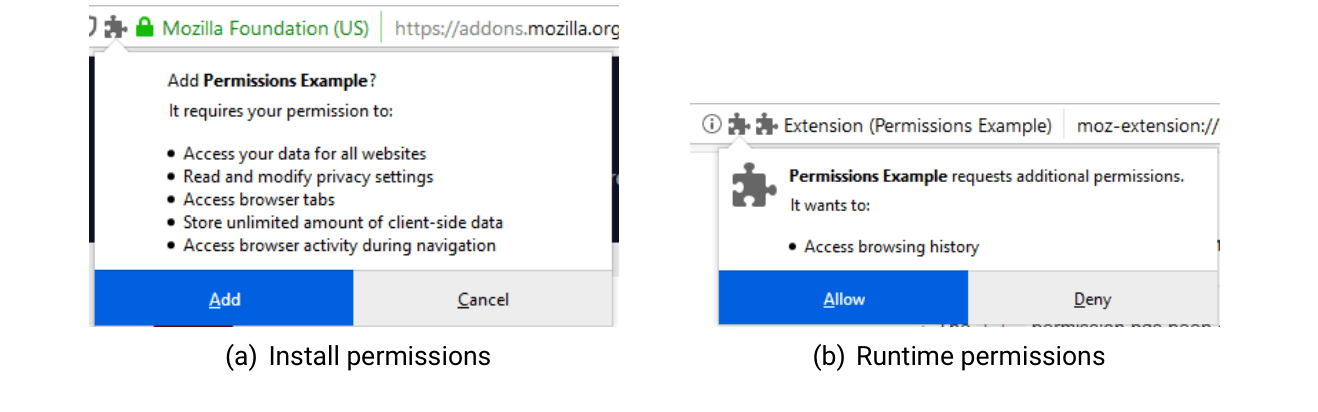
Figure 16.2: Firefox Permission Dialogues
Text description of Figure 16.2
Two screenshots of Firefox pop-up dialogues, side by side.
(a) Install permissions. The address bar shows a puzzle-piece icon, a green padlock, "Mozilla Foundation (US)" and "https://addons.mozilla.org". The dialogue reads:
- "Add Permissions Example?"
- "It requires your permission to:"
- Access your data for all websites
- Read and modify privacy settings
- Access browser tabs
- Store unlimited amount of client-side data
- Access browser activity during navigation
- Two buttons: "Add" (highlighted) and "Cancel".
(b) Runtime permissions. The address bar shows an information icon, two puzzle-piece icons, "Extension (Permissions Example)" and "moz-extension://". The dialogue has a large puzzle-piece icon and reads:
- "Permissions Example requests additional permissions."
- "It wants to:"
- Access browsing history
- Two buttons: "Allow" (highlighted) and "Deny".
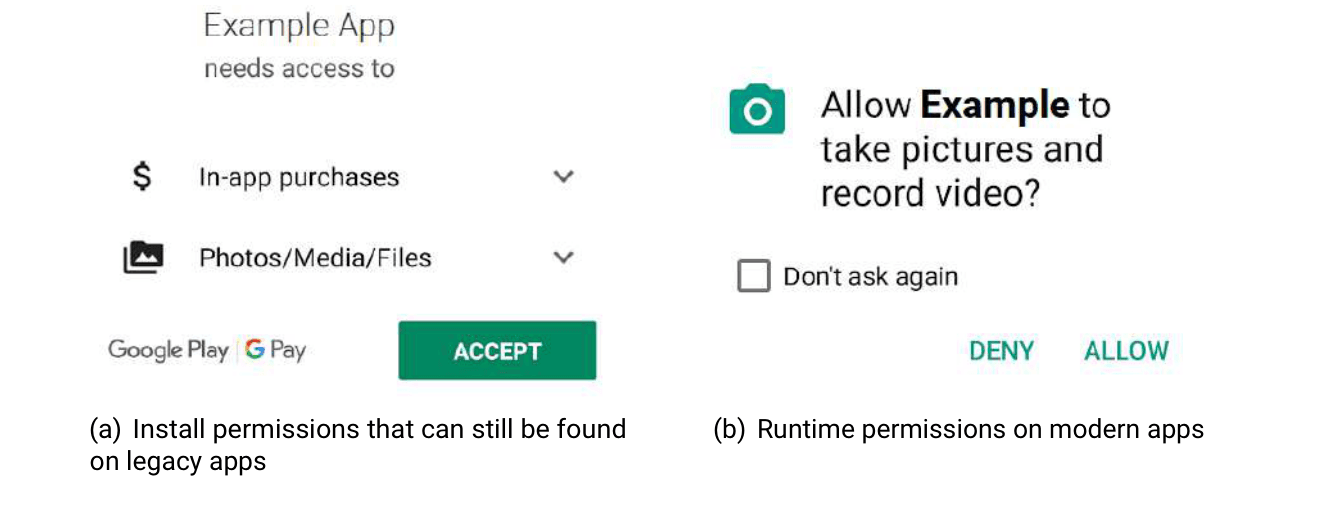
Figure 16.3: Android Permission Dialogues
Text description of Figure 16.3
Two screenshots of Android dialogues, side by side.
(a) Install permissions that can still be found on legacy apps. A Google Play screen reading "Example App needs access to", followed by two expandable rows (each with a down-arrow): "In-app purchases" (dollar icon) and "Photos/Media/Files" (photo-stack icon). At the bottom are the logos "Google Play" and "G Pay", and a green "ACCEPT" button.
(b) Runtime permissions on modern apps. A dialogue with a camera icon reading "Allow Example to take pictures and record video?". Below it is an unchecked checkbox labelled "Don't ask again", and two text buttons: "DENY" and "ALLOW".
Permission Dialogues: Attention, Comprehension and Behaviour While permission dialogues theoretically allow for greater flexibility and control, in practice they tend to have serious limitations. Porter Felt et al. found that Android applications developers tend to request more permissions for their applications than needed [1472]. Hence, applications request access to more resources than strictly necessary, which violates the least-privilege principle. Similarly to developers, end-users struggle with permission dialogues. Porter Felt et al. [1384] found that they often do not correctly understand permission dialogues and ignore them due to habituation (cf. the Human Factors Knowledge Area (Chapter 4)).
16.2.6 Web PKI and HTTPS
The web PKI and the HTTPS [432, 1473] protocol play a central role in modern mobile and web platforms, both of which are based on client-server architectures. In the web, web servers or applications exchange information with browsers. On mobile platforms, apps exchange information with backend (web) servers. In both cases, HTTPS should always be used for secure network connections between clients and servers. To establish secure network connections, the web public key infrastructure is used. Using the web PKI and X.509 certificates, clients and servers can authenticate each other and exchange cryptographic key material for further encrypted information transport. This KA will not provide further details on how the authentication process and the key exchange procedures work in detail (cf. the Network Security Knowledge Area (Chapter 19)). Rather, it gives an overview of aspects specific to web and mobile platforms.
HTTPS is the most widely deployed secure network protocol on the web and mobile. It overlays HTTP on top of the TLS protocol to provide authentication of the server, and integrity and confidentiality for data in transit. While HTTPS offers mutual authentication of servers and clients based on X.509 certificates, the primary use is the authentication of the accessed server. Similar to TLS, HTTPS protects HTTP traffic against eavesdropping and tampering by preventing man-in-the-middle attacks. Since HTTPS encapsulates HTTP traffic, it protects URLs, HTTP header information including cookies and HTTP content against attackers. However, it does not encrypt the IP addresses and port numbers of clients and servers. While HTTPS can hide the information exchanged by clients and servers, it allows eavesdroppers to learn the top-level domains of the websites browsers that users visit, and to identify the backend servers that mobile apps communicate with.
Both web browsers and mobile apps authenticate HTTPS servers by verifying X.509 certificates signed by Certificate Authorities CAs [Certification Authority]. Browsers and mobile apps come with a list of pre-installed certificate authorities or rely on a list of pre-installed CAs in the host operating system. A pre-installed certificate authority list in modern browsers and on modern mobile platforms typically contains hundreds of CAs. To be trusted, an HTTPS server certificate needs to be signed by one pre-installed CA.[5]
Modern browsers present users with a warning message (e. g., see Figure 16.4) when the server certificate could not be validated. The warning messages are intended to indicate a man-in-the-middle attack. However, common reasons for warning messages are invalid certificates, certificates that were issued for a different hostname, network errors between the client and server and errors on the client such as misconfigured clocks [1498]. In most cases, browser users can click-through a warning message and visit a website even if the server certificate could not be validated [1499]. Browsers use coloured indicators in the address bar to display the security information for a website. Websites loaded via HTTP, websites loaded via HTTPS that load some of their content (e.g. CSS or JavaScript files) over an HTTP connection[6] and sites that use an invalid certificate but for which the user clicked through a warning are displayed as insecure. HTTPS websites with a valid certificate are displayed with a corresponding security indicator (e. g., see Figure 16.4). In contrast, users of mobile, non-browser apps cannot easily verify whether an application uses the secure HTTPS protocol with a valid certificate. No visual security indicators similar to those used in browsers are available. Instead, users have to trust application developers to take all the necessary security measures for HTTPS connections.
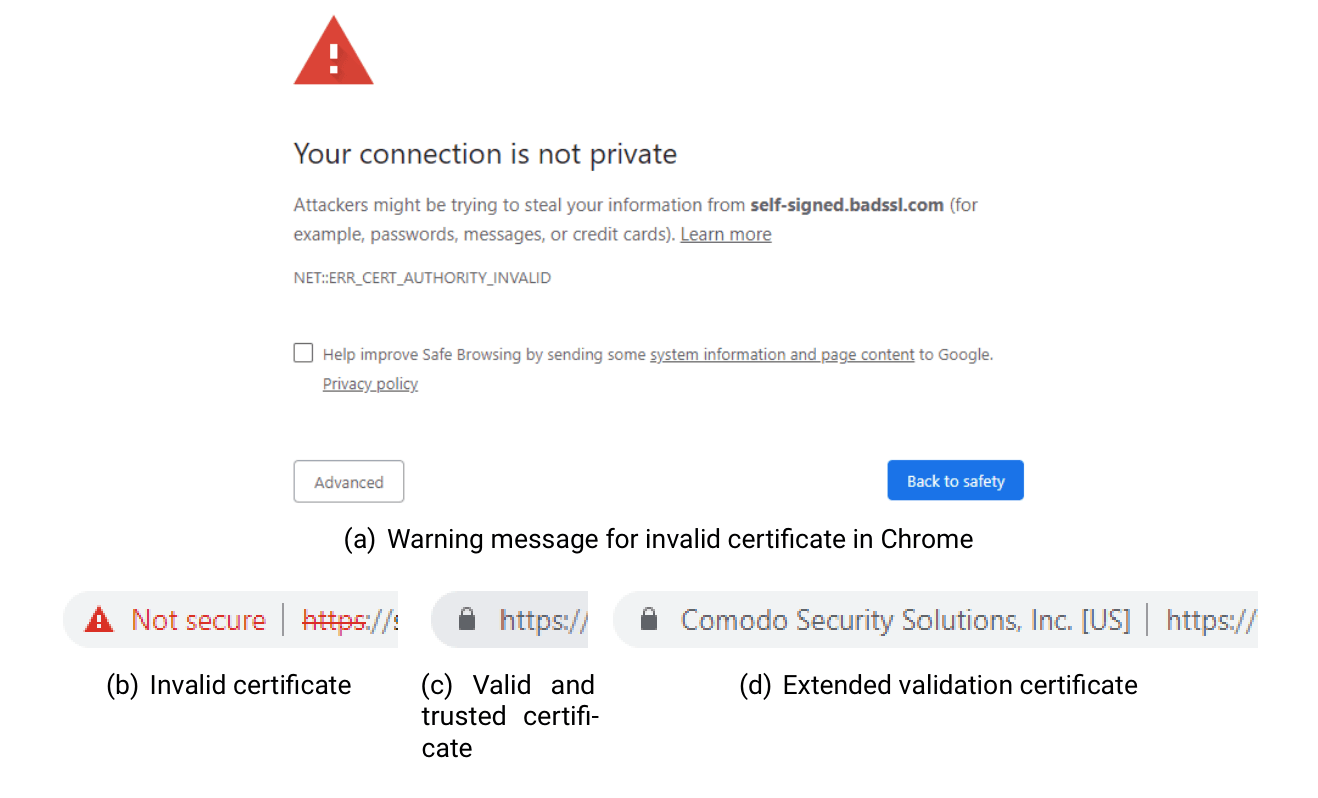
Figure 16.4: Warning messages and security indicators in Chrome.
Text description of Figure 16.4
Four screenshots from Google Chrome.
(a) Warning message for invalid certificate in Chrome. A full-page warning with a red triangle containing an exclamation mark. It reads:
- Heading: "Your connection is not private"
- "Attackers might be trying to steal your information from self-signed.badssl.com (for example, passwords, messages, or credit cards). Learn more" ("Learn more" is a link)
- Error code: "NET::ERR_CERT_AUTHORITY_INVALID"
- An unchecked checkbox: "Help improve Safe Browsing by sending some system information and page content to Google. Privacy policy" (the phrase "system information and page content" and "Privacy policy" are links)
- Two buttons: "Advanced" (outlined) and "Back to safety" (blue).
Three cut-off pieces of the address bar:
- (b) Invalid certificate. A red warning triangle, the red text "Not secure", and the address "https://" with a red strike-through line across "https".
- (c) Valid and trusted certificate. A grey padlock followed by "https://".
- (d) Extended validation certificate. A grey padlock, the organisation name "Comodo Security Solutions, Inc. [US]", then "https://".
As of 2019, most of the popular websites support HTTPS, and the majority of connections from clients to servers in the web and mobile applications use HTTPS to protect their users against man-in-the-middle attacks. To further increase the adoption of HTTPS, server operators are encouraged to use HTTPS for all connections and deploy HTTP Strict Transport Security (HSTS) [1500]. Additionally, browser users can install extensions and plugins to rewrite insecure HTTP URLs to secure HTTPS URLs [1501] if possible, and mobile application frameworks make HTTPS the default network protocol for HTTP connections.
Using HTTPS does protect the content against attackers but does not preserve metadata (e. g., which websites a user visits). Please refer to the Privacy & Online Rights Knowledge Area (Chapter 5) for more information, including private browsing and the Tor network.
Rogue Certificate Authorities and Certificate Transparency The web PKI allows every trusted root certificate authority to issue certificates for any domain. While this allows website operators to freely choose a CA for their website, in the past some CAs have issued fraudulent certificates for malicious purposes. One of the most prominent examples is the DigiNotar CA, which in 2011 [1502] issued fraudulent certificates for multiple websites including Google’s Gmail service. Nobody has been charged for the attack. However, DigiNotar went bankrupt in 2011. Certificate transparency [1503] was introduced to fight fraudulent certificate issuance. Certificate transparency provides a tamper proof data structure and monitors all certificate issuance processes of participating CAs. While it cannot prevent fraudulent certificate issuance, it improves the chances of detection. Clients can verify the correct operation of the certificate transparency providers and should only connect to websites that use X.509 certificates that include a signed certificate timestamp. Certificate transparency is supported by most major certificate authorities and browser vendors.
16.2.7 Authentication
Authentication in the web and on mobile platforms is an important security mechanism designed to enable human users to assert their identity to web applications, mobile devices or mobile apps. Authentication goes hand in hand with authorisation which describes the specification of access privileges to resources. The specified access privileges are later on used to grant or deny access to resources for authenticated users. This section will not give a detailed overview of authentication and authorisation concepts (cf. the Authentication, Authorisation & Accountability Knowledge Area (Chapter 14)) but will focus on authentication mechanisms and technologies relevant for web and mobile platforms.
16.2.7.1 HTTP Authentication
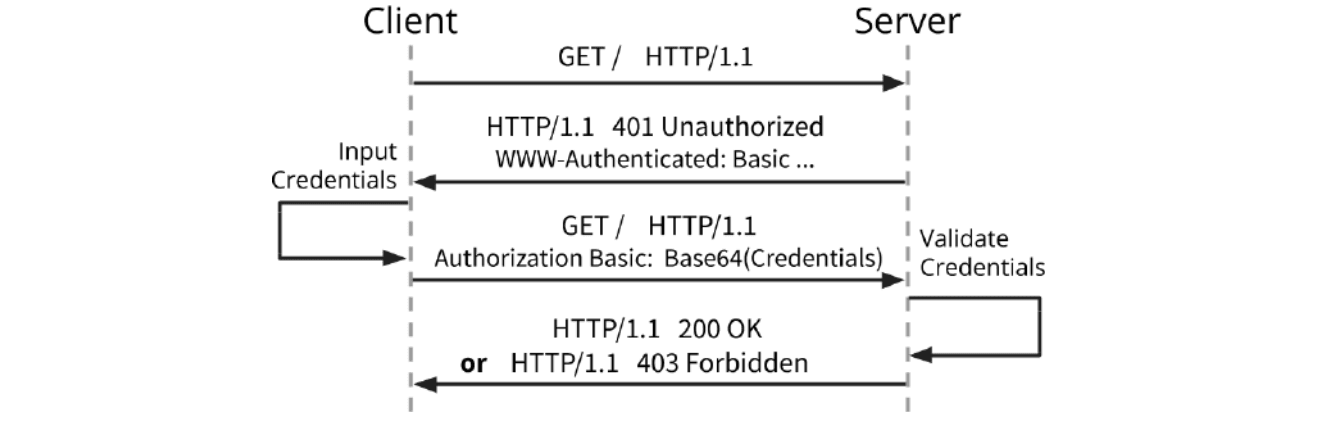
Figure 16.5: Basic HTTP Authentication exchange.
Text description of Figure 16.5
A sequence diagram with two vertical dashed lifelines, "Client" on the left and "Server" on the right. Time runs from top to bottom. Each message is a horizontal arrow.
- Client to Server: "GET / HTTP/1.1".
- Server to Client: "HTTP/1.1 401 Unauthorized" and "WWW-Authenticated: Basic ...".
- On the client side, a self-arrow (loops out and back to the Client lifeline) labelled "Input Credentials".
- Client to Server: "GET / HTTP/1.1" and "Authorization Basic: Base64(Credentials)".
- On the server side, a self-arrow labelled "Validate Credentials".
- Server to Client: "HTTP/1.1 200 OK" or "HTTP/1.1 403 Forbidden" (the word "or" is in bold).
In the HTTP context, authentication generally refers to the concept of verifying the identity of a client to a server, e. g., by requiring the client to provide some pre-established secrets such as username and password with a request. This section highlights two widely used authentication methods on the web, Basic HTTP authentication, and the more frequently used Form-based HTTP authentication.
Basic HTTP authentication [1504] is a mechanism whose results are used to enforce access control to resources. It does not rely on session identifiers or cookie data. Nor does the Basic HTTP authentication scheme require the setup of dedicated login pages, as all major browsers provide an integrated login form. A server can trigger this authentication option by sending a response header containing the “HTTP 401 Unauthorised” status code and a “WWW-Authenticate: Basic” field. Credentials entered into this form by the client are combined with a “:” (“Username:Password”), Base64 encoded for transit (“VXNlcm5hbWU6UGFzc3dvcmQK”), and added as Authorisation header to the next request (“Authorization: Basic VXNlcm5hbWU6UGFzc3dvcmQK”). An example exchange between server and client is shown in Figure 16.5. The Basic authentication scheme is not secure, as the credentials are transmitted after a simple Base64 encoding, which is trivial to reverse. Hence, login credentials are transmitted in plain text across the network, which allows attackers or network observers to easily steal the credentials. Therefore, Basic HTTP authentication should not be used without additional enhancements that ensure confidentiality and integrity such as HTTPS.
Form-based HTTP authentication in which websites use a form to collect login credentials is a widely prevalent form of authentication in modern web and mobile applications. For this scheme, an unauthenticated client trying to access restricted content is shown an HTML-based web form that prompts for their credentials. The client then submits the entered credentials to the sever (e. g., in a POST request). The server validates the form data and authenticates the client on successful validation. Similar to Basic authentication, Form-based authentication exposes user credentials in plain text if not protected by HTTPS.
16.2.7.2 Mobile Device Authentication
Mobile devices deploy a variety of authentication mechanisms to unlock devices, grant users access, and protect their data from illegitimate access. The most common mechanisms for mobile device authentication are passwords, PINs [Personal Identification Number], patterns and biometric features.
Users can use common alphanumeric passwords, including special characters. However, since mobile device authentication is a frequent task [1505], many users tend to unlock their mobile device using numerical PINs. Android devices also support unlock patterns (see Figure 16.6). Instead of choosing a password or PIN, users can pick an unlock pattern from a 3x3 grid.
Modern mobile devices allow users to authenticate using biometric features, including fingerprint and facial recognition. These authentication features rely on hardware security primitives, such as ARM’s TrustZone (cf. the Human Factors Knowledge Area (Chapter 20)).
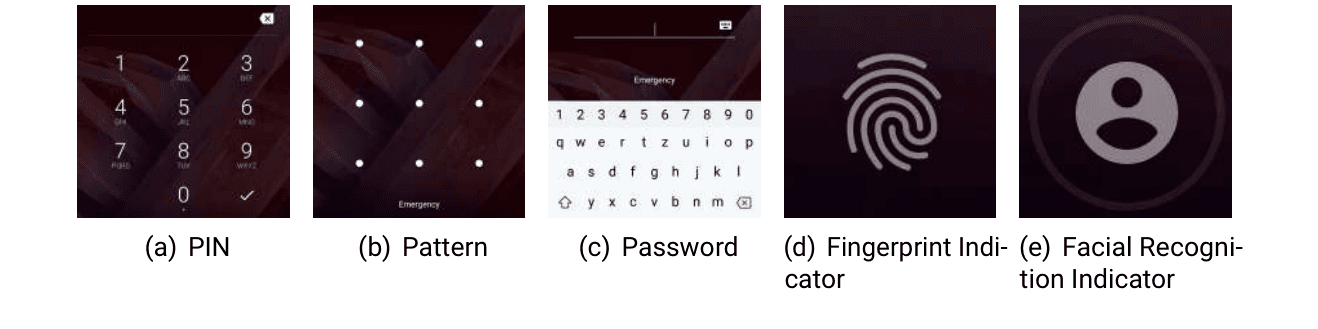
Figure 16.6: Android Device Unlocking
Text description of Figure 16.6
Five screenshots of the Android lock screen, in a row, each on a dark red background.
- (a) PIN. A numeric keypad with the digits 1 to 9 in a grid and 0 at the bottom, a delete key at the top right and a check mark (confirm) key at the bottom right.
- (b) Pattern. A three-by-three grid of dots, with the word "Emergency" at the bottom.
- (c) Password. An empty text field with a keyboard icon, the word "Emergency", and an on-screen keyboard with a number row (1 to 0), letter rows (q w e r t z u i o p, a s d f g h j k l, and a shift key, y x c v b n m, delete key).
- (d) Fingerprint Indicator. A large fingerprint icon.
- (e) Facial Recognition Indicator. A circle containing a person silhouette icon.
Android Unlock Patterns Similar to passwords (see Section 16.2.9) device unlock patterns suffer from multiple weaknesses. Uellenbeck et al. [361] conducted a study to investigate users’ choices of
16.2.8 Cookies
Web servers can associate stateful information with particular clients by using HTTP cookies [1507]. Cookie information (e.g., IDs of items added to the shopping cart in an online shop) is stored by the client. Cookies allow clients and servers to include their unique session identifiers in each HTTP request-response, avoiding the need for repeated authentication. Session cookies expire when the session is closed (e.g., by the client closing the browser) but persistent cookies only expire after a specific time.
Cookie-based authentication allows clients to re-establish sessions every time they send requests to the server with a valid cookie. Cookie-based session management is vulnerable to the hijacking of session identifiers [1508]. Hijackers who post valid session cookies can connect to the attacked server with the privileges of the authenticated victim.
Cookies can also be used to track users across multiple sessions by providers. This behaviour is generally jeopardising user privacy (cf. the Adversarial Behaviours Knowledge Area (Chapter 7) and the Privacy & Online Rights Knowledge Area (Chapter 5)).
16.2.9 Passwords and Alternatives
Passwords are the most widely deployed mechanism to let users authenticate to websites and mobile applications and protect their sensitive information against illegitimate access online. They are the dominant method for user authentication due to their low cost, deployability, convenience and good usability. However, the use of passwords for most online accounts harms account security [1474]. Since humans tend to struggle memorising many different complicated passwords, they often choose weak passwords and re-use the same password for multiple accounts. Weak passwords can easily be guessed by attackers offline or online. Re-used passwords amplify the severity of all password attacks. One compromised online account results in all other accounts protected with the same password as vulnerable. While password guidelines in the past frequently recommended the use of complex passwords, current guidelines state that requiring complex passwords actually weakens password security and advise against policies that include password complexity [1509, 1510]. These aspects are further discussed in the Human Factors Knowledge Area (Chapter 4).
Online service providers deploy various countermeasures to address security issues with weak passwords and password re-use:
16.2.9.1 Password Policies
Password policies are rule sets to encourage users to choose stronger passwords. Some password policies also address the memorability issue. To support stronger passwords, most rules address password length and composition, blacklists and the validity period of a password [1511, 1512].
16.2.9.2 Password Strength Meters
Password Strength Meters (PSMs) pursue the same goal as password policies and aim to encourage the choice of stronger passwords. PSMs typically provide visual feedback or assign passwords scores to express password strength (see Figure 16.7) [1513].
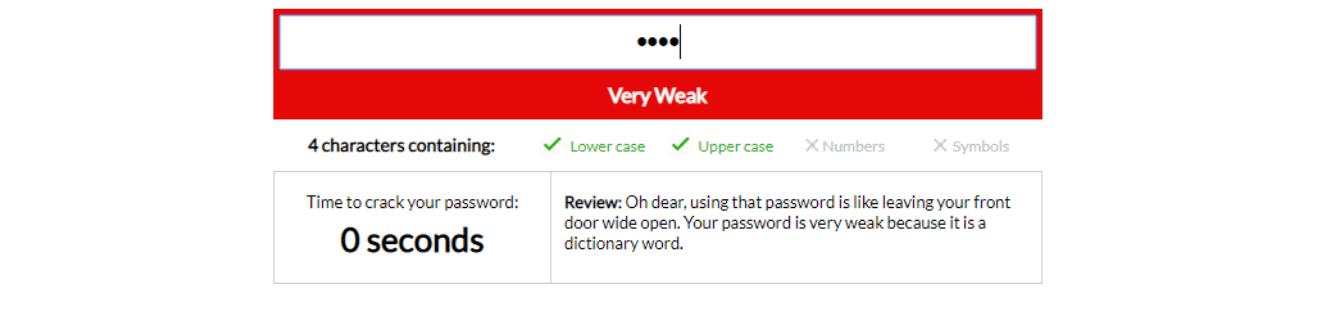
Figure 16.7: A password strength meter
Text description of Figure 16.7
A screenshot of a password field with a strength meter below it.
- The password field holds four masked characters (shown as dots).
- A red bar below the field reads "Very Weak" in white text.
- A line reads "4 characters containing:" followed by four checks: "Lower case" (green check mark), "Upper case" (green check mark), "Numbers" (grey cross, not met) and "Symbols" (grey cross, not met).
- A two-cell panel at the bottom. The left cell reads "Time to crack your password:" and, in large type, "0 seconds". The right cell reads "Review: Oh dear, using that password is like leaving your front door wide open. Your password is very weak because it is a dictionary word."
However, addressing weak passwords and password re-use by deploying restrictive policies or PSMs has only a limited effect on overall password security [1514]. Hence, service providers can use extensions to simple passwords to increase authentication security.
16.2.9.3 Password Managers
Password managers can help users generate, store and retrieve strong passwords. Strong passwords are generated and stored using secure random number generators and secure encryption. They come as locally installable applications, online services or local hardware devices. While they can help users use more diverse and stronger passwords, their effect on overall password security is limited due to usability issues [1515]. For a more detailed discussion please refer to the Human Factors Knowledge Area (Chapter 4).
16.2.9.4 Multi-Factor Authentication
Instead of requiring only one factor (e. g., a password), multi-factor authentication systems require users to present multiple factors during the authentication process [1516]. Website passwords are often complemented with a second factor for two-factor authentication (2FA). Most commonly, the second factor typically makes use of a mobile device. So in addition to a password, users need to have their device at hand to receive a one-time token to authenticate successfully. The European Payment Services Directive 2 (PSD2) requires 2FA for all online payment services in web and mobile environments (cf. the Authentication, Authorisation & Accountability Knowledge Area (Chapter 14)).
16.2.9.5 WebAuthn
The WebAuthn (Web Authentication) [1517] web standard is a core component of the FIDO2 [Fast IDentity Online 2] project (cf. the Authentication, Authorisation & Accountability Knowledge Area (Chapter 14)) and aims to provide a standardised interface for user authentication for web-based applications using public-key cryptography. WebAuthn is supported by most modern web-browsers and mobile operating systems. It can be used in single-factor or multi-factor authentication mode. In multi-factor authentication mode PINs, passcodes, swipe-patterns or biometrics are supported.
16.2.9.6 OAuth
While not an authentication mechanism itself (cf. the Authentication, Authorisation & Accountability Knowledge Area (Chapter 14)), Open Authorisation (OAuth) [1413] can be used for privacy-friendly authentication and authorisation for users against third-party web applications. OAuth uses secure tokens instead of requiring users to provide login credentials such as usernames and passwords. On behalf of their users, OAuth service providers provide access tokens that authorise specific account information to be shared with third-party applications. More recent successors of the OAuth protocol including OAuth 2 [1413] or OpenID Connect [1518] support federations (cf. the Authentication, Authorisation & Accountability Knowledge Area (Chapter 14)). Large providers of online services such as Google or Facebook can act as identity providers to authenticate users, thus helping users to reduce the number of login credentials and accounts. While such protocols aim to provide improved security, the correct and secure implementation of such complex protocols was shown to be error-prone and might allow malicious users to run impersonation attacks [1519].
16.2.10 Frequent Software Updates
Frequent software updates are a fundamental security measure and particularly crucial for web and mobile platforms. This section discusses the different components in the web and mobile ecosystems that require regular updates, the different update strategies, and their pros and cons. Traditionally, browser and mobile device updates required their users to install updates manually whenever new versions were available. Users had to keep an eye on software updates and were responsible for downloading and installing new releases. This approach was error-prone and resulted in many outdated and insecure deployed software components.
Most of the critical components on modern web and mobile platforms have short release cycles. Web browsers, including Google Chrome and Mozilla Firefox, implement auto-update features and frequently push new versions and security patches to their users.
Mobile platforms also provide automatic application updates for third-party apps. While this approach generally results in quicker updates and the timely distribution of security patches, automatic mobile application updates are only enabled by default for devices connected to WiFi. Devices connected to a cellular network (e. g., 3G/4G) do not benefit from automatic application updates by default. This update behaviour ensures most third-party application updates are installed on mobile devices within a week [1520]. Automatic third-party application updates work well on mobile devices. Mobile operating system update behaviour heavily depends on the platform. In particular, many non-Google Android devices suffer from outdated and insecure operating system versions.
Overall, modern web and mobile platforms recognised the disadvantages of non-automatic software updates and now provide automatic or semi-automatic platform or application updates in most cases.
Outdated Third Party Libraries While frequent software updates are crucial in general, updates of third-party libraries is a particularly important security measure for software developers who need to patch their own code and distribute updates, while also tracking vulnerabilities in libraries they use and updating them for better security. Derr et al. [1521] conducted a measurement study of third-party library update frequencies in Android applications and found that a significant number of developers use outdated libraries, exposing their users to security issues in the affected third party libraries. Lauinger et al. [1522] conducted a similar study for JavaScript libraries in web applications and also found many websites that include outdated and vulnerable libraries.
16.3 Client Side Vulnerabilities and Mitigations
This section covers attacks and their countermeasures with a focus on the client. It discusses issues in both modern web browsers and mobile devices. The illustrated security issues highlight aspects that have dominated security discussions in recent years. We focus on attacks that exploit weaknesses in the interaction between users and web browsers and mobile apps. We then discuss challenges resulting from the trend of storing more and more information on the client instead of the server. Finally, we discuss physical attacks that do not focus on exploiting software or human vulnerabilities, but exploit weak points in mobile devices.
16.3.1 Phishing & Clickjacking
This section presents two prevalent issues that exploit user interface weaknesses of both web and mobile clients. Phishing and clickjacking rely on issues humans have with properly verifying URLs and the dynamic content of rendered HTML documents.
16.3.1.1 Phishing
Phishing attacks are fraudulent attacks that aim to steal sensitive information, including login credentials and credit card numbers from victims [1524]. Common types of phishing attacks use email, websites or mobile devices to deceive victims. Attackers disguise themselves as trustworthy parties and send fake emails, show fake websites or send fake SMS or instant messages. Fake websites may look authentic. Attackers can use successfully stolen login credentials or credit card numbers to impersonate victims and access important online accounts. Successful phishing attacks may result in identity theft or loss of money.
Attackers commonly forge websites that appear legitimate to trick users into believing they are interacting with the genuine website. To initiate a phishing attack, attackers plant manipulated links on users via email, a website or any other electronic communication. The manipulated link leads to a forged website that appears to belong to the genuine organisation behind the website in question. Attackers often spoof online social media, online banking or electronic payment provider websites. They trick victims into following manipulated links using misspelled URLs, subdomains or homograph attacks.
Example: Phishing URL In the following example URL: https://paymentorganization.secure.server.com,
it appears that the URL points to the secure.server section of the paymentorganization website. However, in fact the link leads to the paymentorganization.secure section of the server.com website.
To make forged websites look even more authentic, some phishers alter a browser’s address bar by replacing the original address bar with a picture of the legitimate URL or by replacing the original address bar with a new one. Address bar manipulation attacks require the use of JavaScript commands. Additionally, phishers leverage Internationalised Domain Name (IDN) homograph attacks [1535]. Such attacks exploit that users cannot easily distinguish different character encodings. For example, the letters ”l” and ”I” (capital i) are hard to distinguish, and by replacing the Latin characters ”a” with the cyrilic character ”a” in the https://paypal.com url, users can deceptively be redirected to a phished PayPal website. [1536]. Attacks that involve manipulated URLs and address bars are even harder to detect in mobile browsers since the address bar is not visible during regular browsing. Website phishing is one of the most frequent attacks. Most human users find it hard to to spot phishing URLs and websites [352].
Therefore, common countermeasures are anti-phishing training and public awareness campaigns [1523] that try to sensitise users and teach them how to spot phishing URLs. Modern browsers deploy technical security measures, including blacklists and visual indicators that highlight the top-level domain of a URL, e.g. Google Chrome shows URLs using an encoding that exposes deceptive characters in IDN attacks [7].
Drive-by-download Attacks Drive-by-download attacks happen when users visit a website, click on a link or on an attachment in a phishing email or on a malicious popup window. While being a general problem in the web, drive-by-downloads play a particular role in phishing attacks. Instead of visiting a benign website, drive-by-download attacks download and install malware (cf. the Malware & Attack Technologies Knowledge Area (Chapter 6)) on a user’s computer. Attackers need to fingerprint victim clients and exploit vulnerable software components on the client’s computer to plant the malware. Detecting such attacks is an active research area and includes approaches such as anomaly or signature based malware detection [792].
16.3.1.2 Clickjacking
In a clickjacking attack, attackers manipulate the visual appearance of a website to trick users into clicking on a fake link, button, or image. Clickjacking is also known as a user interface redress attack and belongs to the class of confused deputy attacks [1525]. Attackers fool their victims using transparent or opaque layers over original websites. While victims believe they have clicked on the overlay element, the original website element is clicked on. Attackers can thus make their victims trigger arbitrary actions on the original website. The attack website uses an iFrame to load the target website and can make use of the absolute positioning features of iFrames for correct visual alignment. Thus, it is hard for victims to detect the attack elements over the original website. Clickjacking attacks are particularly dangerous when victims have already logged in to an online account and visit their account settings website. In those cases, an attacker can trick the victim into performing actions on a trusted site when the victim is already logged in. One of the most prominent clickjacking attacks hit the Adobe Flash plugin settings page [1526]. Attackers used invisible iFrames to trick their victims into changing the plugin’s security settings and permitting the attackers to access the microphone and camera of their victims’ machines.
Clickjacking attacks can be used to launch other attacks against websites and their users, including Cross-Site Request Forgery and Cross-Site Scripting attacks (see Section 16.4.1) [1525].
A clickjacking attack is not a programming mistake but a conceptual problem with JavaScript. Hence, detection and prevention are not trivial. Detecting and preventing clickjacking attacks can be done both server- and client-side. Web browser users can disable JavaScript and iFrames to prevent clickjacking attacks. However, since this would break many legitimate websites, different browser plugins (e. g., NoScript [1527]) allow the controlled execution of JavaScript scripts on behalf of the user. In order to contain the impact of clickjacking attacks, users should log out of online accounts when leaving a website, although this could be impractical. In order to prevent clickjacking attacks on the server-side, website developers need to make sure that a website is not frame-able, i. e. a website does not load if it is inside an iFrame. Websites can include JavaScript code to detect whether a website has been put into an iFrame and break out of the iFrame. This defence technique is called FrameBusting [1528]. However, since users might have disabled JavaScript, this method is not reliable. The recommended server-side defence mechanism is to set a proper HTTP response header. The X-FRAME-OPTIONS header can be set to DENY, which will prevent a website being loaded inside an iFrame.
Clickjacking attacks affect both desktop and mobile web browsers.
Phishing and Clickjacking on Mobile Devices Phishing and Clickjacking are not limited to browsers and the web. Mobile application users are susceptible to both attacks. Aonzo et al. [1537] find that it is possible to trick users into an end-to-end phishing attack that allows attackers to gain full UI control by abusing Android’s Instant App feature and password managers to steal login credentials. Fratantonio et al. [1538] describe the Cloak & Dagger attack that allows a malicious application with only two permissions (cf. Section 16.2.5) to take control over the entire UI loop. The attack allows for advanced clickjacking, keylogging, stealthy phishing and silent phone unlocking.
16.3.2 Client Side Storage
Client-side storage refers to areas that a browser or operating system provides to websites or mobile applications to read and write information. Storage is local to the client and does not require server-side resources or an active Internet connection. At the same time, malicious users may manipulate stored information. Hence, client-side storage areas need to be protected from malicious access. This section describes common client-side storage areas and their protection mechanisms.
16.3.2.1 Client Side Storage in the Browser
Historically, client-side browser storage was only used to store cookie information (see Section 16.2.8). However, due to their simple design and limited capacity, cookies cannot be used to store large or complex amounts of information. With the rise of HTML5, more powerful and feature-rich alternatives for client-side storage in the browser exist. These include WebStorage [1529], which is similar to cookies and stores key-value pairs, and IndexedDB [1530], which serves as a database in the vein of noSQL databases and can be used to store documents, other files and binary blobs.
As mentioned, the primary security issue with client-side storage mechanisms is that malicious users can manipulate them. To guarantee integrity for sensitive information (e. g., session information), developers are advised to cryptographically sign the data stored on the client and verify it upon retrieval.
In addition to information integrity, a second important aspect of WebStorage and IndexedDB storage is that stored information is not automatically cleared after users leave a website. To store information in a session-like fashion, web application developers are advised to rely on the sessionStorage object of the WebStorage API [1532].
16.3.2.2 Client Side Storage in Mobile Applications
In mobile applications, handling client-side storage security also depends on the type of information and storage mechanism, e. g., private storage of an application or public storage such as an SD [Secure Digital] card. Most importantly, data should be digitally signed and verified (cf. the Cryptography Knowledge Area (Chapter 10)) for both browser and mobile client storage purposes. It is recommended that developers sign and encrypt sensitive information and apply proper user input sanitisation. This is particularly relevant for shared storage such as SD-cards that do not use secure access control mechanisms. Instead, proper access administration mechanisms are provided for storage areas that are private to an application.
Sensitive Information Leaks in Android Applications Enck et al. [404] investigated the security of 1,100 popular Android applications. Amongst other things, they found that a significant number of apps leaked sensitive user information to publicly readable storage locations such as log files and the SD card. Reardon et al. [1539] discovered that some sensitive information leaks are made intentionally to pass sensitive information to another, collaborating and malicious app.
16.3.3 Physical Attacks
Instead of attacking web or mobile applications’ code, physical attacks aim to exploit bugs and weak points that result from using a device. We focus on two representative examples below.
16.3.3.1 Smudge attacks
In a smudge attack, an attacker tries to learn passwords, PINs or unlock patterns entered on a touchscreen device. The main problem with entering sensitive unlock information through a touchscreen is the oily smudges that users’ fingers leave behind when unlocking a device. Using inexpensive cameras and image processing software, an attacker can recover the grease trails and infer unlock patterns, passwords, and PINs [1533]. To perform a smudge attack, an attacker needs a clear view of the target display.
16.3.3.2 Shoulder Surfing
Shoulder surfing is a physical attack where an attacker tries to obtain sensitive information such as passwords, PINs, unlock patterns, or credit card numbers [1534]. For a shoulder surfing attack, an attacker needs a clear view of the target display. The attacker can mount a shoulder surfing attack either directly by looking over the victim’s shoulder or from a longer range by using dedicated tools such as cameras or telescopes. Shoulder surfing attacks are particularly dangerous for mobile device users when authenticating to the device or online services in public spaces such as trains, railways, and airports.
16.4 Server Side Vulnerabilities and Mitigations
This section discusses server-side security. It provides details for common aspects of server security, including well-known vulnerabilities and mitigations. The section discusses root causes, illustrates examples, and explains mitigations. The aspects discussed below are central for the web and mobile environments and dominated many of the security discussions in this area in the past.
16.4.1 Injection Vulnerabilities
Injection attacks occur whenever applications suffer from insufficient user input validation so that attackers can insert code into the control flow of the application (cf. the Software Security Knowledge Area (Chapter 15)). Prevalent injection vulnerabilities for web and mobile applications are SQL and Shell injections [1477]. Due to inadequate sanitisation of user input, requests to a database or shell commands can be manipulated by an attacker. Such attacks can leak or modify information stored in the database or issue commands on a system in ways developers or operators have not intended. The main goal of injection attacks is to circumvent authentication and expose sensitive information such as login credentials, personally identifiable information, or valuable intellectual property of enterprises.
Injection vulnerabilities can be addressed by adequately sanitising attacker-controlled information and deploying proper access control policies. The goal of input sanitisation is to filter invalid and dangerous input. Additionally, strict access control policies can be implemented to prevent injected code from accessing or manipulating information [1540].
16.4.1.1 SQL-Injection
SQL-injection attacks refer to code injections into database queries issued to relational databases using the Structured Query Language (SQL). Many web and mobile applications allow users to enter information through forms or URL parameters. SQL injection occurs if such user input is not filtered correctly for escape characters and then used to build SQL statements. Enabling attackers to modify SQL statements can result in malicious access or manipulation of information stored in the database.
Example: SQL Injection attack The statement below illustrates the vulnerability.
vuln_statement = " ’SELECT * FROM creditcards WHERE number = ’ " + 1 user_input + " ; ’ "
The intention of the statement is to retrieve credit card information for a given user input. An example for an expected input 123456789. However, the statement above allows malicious values for the user_input variable. An attacker might provide ’ OR ’1’=’1 as input which would render the following SQL statement:
vuln_statement = " ’SELECT * FROM creditcards WHERE number = ’ ’ 1 OR [Onion Router] ’ 1 ’ = ’ 1 ’ ; "
Instead of retrieving detailed credit card information only for one specific credit card number, the statement retrieves information for all credit cards stored in the database table. A potential web application with the above SQL injection vulnerability could leak sensitive credit card information for all users of the application.
The consequences of the above SQL injection vulnerability might be directly visible to the attacker if all credit card details are listed on a results page. However, the impact of an SQL injection can also be hidden and not visible to the attacker.
blind SQL injections [1541], do not display the results of the vulnerability directly to the attacker (e. g., because results are not listed on a website). However, the impact of an attack might still be visible through observing information as part of a true-false response of the database. Attackers might be able to determine the true-false response based on the web application response and the way the web site is displayed.
second order In contrast to the previous types of SQL injection attacks, second order attacks occur whenever user submitted input is stored in the database for later use. Other parts of the application then rely on the stored user input without escaping or filtering it properly.
One way to mitigate SQL injection attacks is with the use of prepared statements [1542, 1543]. Instead of embedding user input into raw SQL statements (see above), prepared statements use placeholder [8] variables to process user input. Placeholder variables are limited to store values of a given type and prohibit the input of arbitrary SQL code fragments. SQL injections attacks would result in invalid parameter values in most cases and not work as intended by an attacker. Also, prepared statements are supported by many web application development frameworks at the coding level using Object Relational Mapping (ORM) interfaces. ORMs do not require developers to write SQL queries themselves but generate database statements from code. While prepared statements are an effective mitigation mechanism, a further straightforward way is to escape characters in user input that have a special meaning in SQL statements. However, this approach is error-prone, and many applications that apply some form of SQL escaping are still vulnerable to SQL injection attacks. The reasons for the mistakes are often incomplete lists of characters that require escaping. When escaping is used, developers should rely on functions provided by web application development frameworks (e. g. the mysqli_real_escape_string() function in PHP) instead of implementing their own escaping functionality.
16.4.1.2 Command Injections
This type of injection attack affects vulnerable applications that can be exploited to execute arbitrary commands on the host operating system of a web application [1550]. Similar to SQL injection attacks, command injections are mostly possible due to insufficient user input validation. Vulnerable commands usually run with the same privileges as the host application.
An example of a command injection attack is a web application that converts user-provided images using a vulnerable image command line program. Providing malicious input (e. g., a filename or a specially crafted support graphic that includes malicious code) might allow attackers to exploit insufficient input validation and extend the original command or run additional system commands.
A mitigation for command injection attacks is to construct the command strings, including all parameters in a safe way that does not allow attackers to exploit malicious string input. In addition to proper input validation due to escaping, following the principle of least-privilege and restricting the privileges of system commands and the calling application is recommended. The number of callable system commands should be limited by using string literals instead of raw user-supplied strings. In order to further increase security, regular code reviews are recommended, and vulnerability databases (e. g., the CVE [Common Vulnerabilities and Exposures] [1544] database) should be monitored for new vulnerabilities. Finally, if possible, executing system commands should be avoided altogether. Instead, the use of API calls in the respective development framework is recommended.
16.4.1.3 User Uploaded Files
Files provided by users such as images or PDFs [Portable Document Format] have to be handled with care. Malicious files trigger unwanted command execution on the host operating system of the server, overload the host system, trigger client-side attacks, or deface vulnerable applications [1477].
Example: Online Social Network An example application could be an online social network that allows users to upload their avatar picture. Without proper mitigation techniques in place, the web application itself might be vulnerable. A malicious user could upload a .php file. Accessing that file might prompt the server to process it as an executable PHP file. This vulnerability would allow attackers to both execute code on the server with the permissions of the PHP process and also control the content served to other users of the application.
To prevent attacks through user-uploaded files, both meta-data including file names and the actual content of user-uploaded files need to be restricted and filtered, e.g. looking for malware in uploaded files. Filenames and paths should be constructed using string literals instead of raw strings and proper mime-types for HTTP responses used whenever possible.
Files that are only available for download and should not be displayed inline in the browser, can be tagged with a Content-Disposition HTTP response header [1545]. Another successful mitigation for the above issue is to serve files from a different domain. If the domain is not a subdomain of the original domain, the SOP 16.2.4.2 prevents cookies and other critical information from being accessible to the malicious file. Additionally, JavaScript and HTML files are protected by the SOP as well.
16.4.1.4 Local File Inclusion
This type of vulnerability is a particular form of the above command injection or user-uploaded files vulnerabilities [1477]. For example, attackers can exploit a command injection, use a malformed path in a database or a manipulated filename. The file path resulting from one of these vulnerabilities can be crafted to point to a local file on the server, e. g., a .htaccess or the /etc/shadow file. A vulnerable web application might then access the maliciously crafted file path and instead of loading a benign file, read and send the content of the attacker-chosen file and e. g. leak login credentials in the /etc/shadow file.
In addition to sanitisation of file path parameters such as leading / and .. in user input, the application of the least privilege principle is recommended. A web application should be executed with minimal privileges and so that it cannot access sensitive files.
16.4.1.5 Cross-Site Scripting (XSS)
Cross-Site Scripting (XSS) [1546] attacks are injection vulnerabilities that allow attackers to inject malicious scripts (e. g., JavaScript) into benign websites. They can occur whenever malicious website users are able to submit client scripts to web applications that redistribute the malicious code to other end-users. Common examples of websites that are vulnerable to XSS attacks are message forums that receive user content and show it to other users. The primary root cause for XSS vulnerabilities is web applications that do not deploy effective input validation mechanisms. Untrusted and non-validated user-provided data might contain client-side scripts. Without proper user input validation, a malicious JavaScript previously provided by one user, might be distributed to other users and manipulate the website they are visiting or steal sensitive information. In an XSS attack, the client browser cannot detect the malicious code, since it is sent from the original remote host, i. e. same-origin-policy based security measures are ineffective. We distinguish two types of XSS attacks:
stored In a stored XSS attack the malicious script is permanently stored on the target server (e. g. in a database) and distributed to the victims whenever they request the stored script for example as part of a comment in a message forum. Stored XSS attacks are also called permanent or Type-I XSS.
reflected In a reflected XSS attack, the malicious script is not permanently stored on the target server, but reflected by the server to the victims. Malicious scripts in reflected attacks are distributed through different channels. A common way of delivering a malicious script is to craft a link to the target website. The link contains the script and clicking the link executes the malicious script in the website’s script execution context. Reflected XSS attacks are also called non-permanent or Type-II XSS.
Preventing both types of XSS attacks requires rigorous user input validation and escaping by the server. The most effective means of input validation is a whitelist approach, which denies any input that is not explicitly allowed. For proper and secure entity encoding, the use of a security encoding library is recommended, since writing encoders is very difficult and code review in combination with the use of static code analysis tools is also valuable.
Since eliminating XSS vulnerabilities entirely due to user input sanitization is hard, different approaches are discussed in the literature. A promising approach is the randomisation of HTML tags and attributes. Web applications randomise their order so clients can distinguish between benign and trusted content and potentially untrusted malicious content. As long as an attacker does not know the randomisation mapping, clients can successfully distinguish trusted from untrusted scripts [1551].
16.4.1.6 Cross-Site Request Forgery
Cross Site Request Forgery (CSRF) [1547] attacks mislead victims into submitting malicious HTTP requests to remote servers. The malicious request is executed on behalf of the user and inherits their identity and permissions. CSRF attacks are so dangerous because most requests to remote servers include credentials and session information associated with a user’s identity, including session cookies. Authenticated users are particularly attractive victims for attackers since it can be hard for remote servers to distinguish between benign and malicious requests as long as they are submitted from the victim’s machine. CSRF attacks do not easily allow attackers to access the server response for the malicious request. Therefore, the main goal of a CSRF attack is to trick victims into submitting state-changing requests to remote servers. Attractive targets are requests that change the victim’s credentials or purchase something.
Example: Online Banking In the following online banking scenario Alice wishes to transfer 50 EUR [euros] to Bob using an online banking website that is vulnerable to a CSRF attack. A benign request for an authenticated user Alice for the mentioned scenario could be similar to GET https://myonlinebank.net/transaction?to=bob&value=50. In a first step, an attacker can craft a malicious URL such as https://myonlinebank.et/transaction?to=attacker&value=50 and replace the intended recipient of the transaction with the attacker’s account. The second step for successful CSRF attack requires the attacker to trick Alice into sending the malicious request with her web browser, e. g. by sending a SPAM email containing the request which Alice subsequently clicks on. However, CSRF attacks are not limited to HTTP GET requests but also affect POST requests, e. g. by crafting malicious <form> tags.
Many misconceptions lead to ineffective countermeasures. CSRF attacks cannot be prevented by using secret cookies because all cookies are sent from a victim to the remote server. Also, the use of HTTPS is ineffective as long as the malicious request is sent from the victim, because the protocol does not matter and the use of POST requests for sensitive information is insufficient since attackers can craft malicious HTML forms with hidden fields. To effectively prevent CSRF attacks, it is recommended to include randomised tokens in sensitive requests, e. g., by adding them to the request headers. The tokens must be unique per session and generated with a secure random number generator to prevent attackers from predicting them. Servers must not accept requests from authenticated clients that do not include a valid token.
16.4.2 Server Side Misconfigurations & Vulnerable Components
A web application stack consists of multiple components, including web servers, web application frameworks, database servers, firewall systems, and load balancers and proxies. Overall, web application security highly depends on the security of each of the involved components.
A single insecure component is often enough to allow an attacker access to the web application and further escalate their attack from the inside. This is why deploying and maintaining a secure web application requires more than focusing on the code of the app itself. Every component of the web application stack needs to be configured securely and kept up to date (see Section 16.2.10).
The Heartbleed Vulnerability A famous example of a critical vulnerability that affected many web application stacks in 2014 is Heartbleed [1548]. Heartbleed was a vulnerability in the widely used OpenSSL library and caused web servers to leak information stored in the webservers’ memory. This included TLS certificate information such as private keys, connection encryption details, and any data the user and server communicated, including passwords, usernames, and credit card information [1549]. To fix affected systems, administrators had to update their OpenSSL libraries as quickly as possible and ideally also revoke certificates and prompt users to change their passwords.
As previously discussed, the principle of least privilege can reduce a web application’s attack surface tremendously. Proper firewall and load balancer configurations serve as examples:
16.4.2.1 Firewall
To protect a webserver, a firewall should be configured to only allow access from outside where access is needed. Access should be limited to ports like 80 and 443 for HTTP requests via the Internet and restricting system configuration ports for SSH [Secure Shell] and alike to the internal network (cf. the Network Security Knowledge Area (Chapter 19)).
16.4.2.2 Load Balancers
A load balancer is a widely deployed component in many web applications. Load balancers control HTTP traffic between servers and clients and provide additional access control for web application resources. They can be used to direct requests and responses to different web servers or ports, balance traffic load between multiple web servers and protect areas of a website with additional access control mechanisms. The most common approach for controlling access is the use of .htaccess files. They can restrict access to content on the original web server and instruct load balancers to require additional authentication.
Load balancers can also serve for rate limiting purposes. They can limit request size, allowed request methods and paths or define timeouts. The main use of rate-limiting is to reduce the potentially negative impact of denial of service attacks on a web server and prevent users from spamming systems, as well as restrict and prevent unexpected behavior.
Additionally, load balancers can be used to provide secure TLS connections for web applications. When managing TLS, load balancers serve as a network connection endpoint for the TLS encryption and either establish new TLS connections to the application service or connect to the web application server using plain HTTP. If the web application server is not hosted on the same machine, using plain network connections might leak information to the internal network. However, if the web application server does not provide HTTPS itself, using a load balancer as a TLS endpoint increases security.
HTTPS Misconfigurations One cornerstone of web and mobile security is the correct and secure configuration of HTTPS on web servers. However, Holz et al. [1552] found that a significant number of popular websites deploy invalid certificates with incomplete certificate chains, issued for the wrong hostname or expired lifetime. In a similar study Fahl et al. [1553] confirmed these findings and also asked website operators for the reasons for deploying invalid certificates. Most operators were not aware of using an invalid certificate or used one on purpose because they did not trust the web PKI. Krombholz et al. [1554, 1555] conducted a set of studies and found that operators have difficulties with correctly configuring HTTPS, or they harbour misconceptions about the security features of HTTPS.
16.4.2.3 Databases
Similar to load balancers and firewalls, many web applications include databases to store user information permanently. Often, databases are operated as an additional service that is hosted on another server. The application server interacts with the database through libraries and APIs. It is important to prevent injection vulnerabilities on the server. Additionally, errors in the implementation of database libraries or coarse permissions required by the application can lead to vulnerabilities.
To reduce the attack vector, most database systems provide user management, to limit user privileges to create, read, delete or modify entries in tables and across databases. In this way one database per application can be created and particular users with read-only permissions can be used by the application server.
An important aspect of increasing database security is the decision on how to store data. Encrypting data before storage in the database can help. However, especially for passwords or other information that only needs to be compared for equality, hashing before storage can tremendously increase security. In the case of a data leak, the sensitive information remains unreadable. To store passwords securely, web and mobile app developers are recommended to use a secure hash function such as Argon2 [1556] or PBKDF2 [Password-Based Key Derivation Function 2] [1557] in combination with a cryptographically strong credential-specific salt. A salt is a cryptographically strong fixed-length random value and needs to be newly generated for for each set of credentials [1558].
Password Leaks Developers tend to store plain passwords, credit card information or other sensitive information in databases instead of encrypting or hashing them (cf. the Human Factors Knowledge Area (Chapter 4)). Hence, many leaks of password databases or credit card information put users at risk [1559]. Modern browsers and password managers help users to avoid passwords that were part of a previous data breach [1560].
16.5 Conclusion
As we have shown, web and mobile security is a diverse and broad topic covering many areas. This Knowledge Area emphasised an intersectional approach by exploring security concepts and mechanisms that can be found in both the web and the mobile worlds. It therefore builds upon and extends the insights from other Knowledge Areas, in particular the Software Security Knowledge Area (Chapter 15), Network Security Knowledge Area (Chapter 19), Human Factors Knowledge Area (Chapter 4), Operating Systems & Virtualisation Security Knowledge Area (Chapter 11), Privacy & Online Rights Knowledge Area (Chapter 5), Authentication, Authorisation & Accountability Knowledge Area (Chapter 14) and the Physical Layer & Telecommunications Security Knowledge Area (Chapter 22).
We showed that due to the ubiquitous availability and use of web and mobile applications and devices, paying attention to their security issues is crucial for overall information security. We discussed web technologies that build the core of both web and mobile security, outlined their characteristics and illustrated how they are different from other ecosystems.
Later on, we split the discussion into client- and server-side aspects. In particular, this Knowledge Area has focused on attacks and defences that were prevalent in web and mobile clients and servers and that dominated discussions in recent years.
Cross-reference of Topics vs Reference Material
| Section | References |
|---|---|
| 16.2 Fundamental Concepts and Approaches | |
| 16.2.1 Appification | [1468, 1476] |
| 16.2.2 Webification | [1471, 1477, 1486] |
| 16.2.3 Application Stores | [1487, 1488, 1490] |
| 16.2.4 Sandboxing | [1491–1494] |
| 16.2.5 Permission Dialog Based Access Control | [1384, 1472] |
| 16.2.6 Web PKI and HTTPS | [432, 1473, 1498, 1503] |
| 16.2.7 Authentication | [361, 1504] |
| 16.2.8 Cookies | [1507] |
| 16.2.9 Passwords and Alternatives | [1511, 1513, 1515] |
| 16.2.10 Frequent Software Updates | [1521, 1522] |
| 16.3 Client Side Vulnerabilities and Mitigations | |
| 16.3.1 Phishing & Clickjacking | [352, 1523, 1524, 1528] |
| 16.3.2 Client Side Storage | [1529] |
| 16.3.3 Physical Attacks | [1533, 1534] |
| 16.4 Server Side Vulnerabilities and Mitigations | |
| 16.4.1 Injection Vulnerabilities | [1540–1542, 1546, 1547] |
| 16.4.2 Server Side Misconfigurations & Vulnerable Components | [1552, 1554, 1555, 1560] |
Further Reading
The following resources provide a deeper insight into web and mobile security as well as guidance and recommendations for preventing and handling the vulnerabilities presented and discussed above.
The OWASP Project & Wiki
The Open Web Application Security Project (OWASP) is an international not-for-profit charitable organisation providing practical information about application and web security. It funds many projects including surveys like the OWASP TOP 10, books, CTFs [Capture The Flag] and a wiki containing in-depth descriptions, recommendations and checklists for vulnerabilities and security measurements. The core wiki can be found at the OWASP website.
Mozilla Developer Network
An all-encompassing resource provided by Mozilla covering open web standards, including security advice and cross platform behaviour for Javascript APIs, as well as a HTML and CSS specifications. It can be found at the MDN Web Docs
Android Developers
The official documentation for the Android development ecosystem, including security advice for client side storage, webviews, permissions, Android databases and network connections. It also includes information for outdated operating system versions and the Google Play Update process. Available at the Android Developers website
References
- [352] P. Kumaraguru, S. Sheng, A. Acquisti, L. F. Cranor, and J. I. Hong, “Teaching johnny not to fall for phish,” ACM Trans. Internet Techn., vol. 10, no. 2, pp. 7:1–7:31, 2010.
- [361] S. Uellenbeck, M. Dürmuth, C. Wolf, and T. Holz, “Quantifying the security of graphical passwords: the case of android unlock patterns,” in 2013 ACM SIGSAC Conference on Computer and Communications Security, CCS’13, Berlin, Germany, November 4-8, 2013, A. Sadeghi, V. D. Gligor, and M. Yung, Eds. ACM, 2013, pp. 161–172.
- [398] S. Fahl, M. Harbach, T. Muders, M. Smith, L. Baumgärtner, and B. Freisleben, “Why eve and mallory love android: an analysis of android SSL (in)security,” in the ACM Conference on Computer and Communications Security, CCS’12, Raleigh, NC, USA, October 16-18, 2012, T. Yu, G. Danezis, and V. D. Gligor, Eds. ACM, 2012, pp. 50–61.
- [404] W. Enck, D. Octeau, P. D. McDaniel, and S. Chaudhuri, “A study of android application security,” in 20th USENIX Security Symposium, San Francisco, CA, USA, August 8-12, 2011, Proceedings. USENIX Association, 2011.
- [432] E. Rescorla, “The transport layer security (TLS) protocol version 1.3,” RFC, vol. 8446, pp. 1–160, 2018.
- [792] M. Cova, C. Krügel, and G. Vigna, “Detection and analysis of drive-by-download attacks and malicious javascript code,” in Proceedings of the 19th International Conference on World Wide Web, WWW 2010, Raleigh, North Carolina, USA, April 26-30, 2010, M. Rappa, P. Jones, J. Freire, and S. Chakrabarti, Eds. ACM, 2010, pp. 281–290.
- [1384] A. P. Felt, E. Ha, S. Egelman, A. Haney, E. Chin, and D. A. Wagner, “Android permissions: user attention, comprehension, and behavior,” in Symposium On Usable Privacy and Security, SOUPS ’12, Washington, DC, USA - July 11 - 13, 2012, L. F. Cranor, Ed. ACM, 2012, pp. 1–14.
- [1413] D. Hardt, “The oauth 2.0 authorization framework,” RFC, vol. 6749, pp. 1–76, 2012.
- [1465] Google, “Manage flash in your users’ Chrome browsers,” 2019.
- [1466] OWASP, “OWASP cheat sheet series,” 2019.
- [1467] R. T. Fielding, J. Gettys, J. C. Mogul, H. F. Nielsen, L. Masinter, P. J. Leach, and T. Berners-Lee, “Hypertext transfer protocol - HTTP/1.1,” RFC, vol. 2616, pp. 1–176, 1999.
- [1468] Y. Acar, M. Backes, S. Bugiel, S. Fahl, P. D. McDaniel, and M. Smith, “Sok: Lessons learned from android security research for appified software platforms,” in IEEE Symposium on Security and Privacy, SP 2016, San Jose, CA, USA, May 22-26, 2016. IEEE Computer Society, 2016, pp. 433–451.
- [1469] T. Berners-Lee, L. Masinter, and M. McCahill, “Uniform resource locators (URL),” RFC, vol. 1738, pp. 1–25, 1994.
- [1470] W3C, “HTML 5.2,” Dec 2017.
- [1471] “Ecmascript language specification,” August 2019.
- [1472] A. P. Felt, E. Chin, S. Hanna, D. Song, and D. A. Wagner, “Android permissions demystified,” in Proceedings of the 18th ACM Conference on Computer and Communications Security, CCS 2011, Chicago, Illinois, USA, October 17-21, 2011, Y. Chen, G. Danezis, and V. Shmatikov, Eds. ACM, 2011, pp. 627–638.
- [1473] E. Rescorla, “HTTP over TLS,” RFC, vol. 2818, pp. 1–7, 2000.
- [1474] J. Bonneau, C. Herley, P. C. van Oorschot, and F. Stajano, “The quest to replace passwords: A framework for comparative evaluation of web authentication schemes,” in IEEE Symposium on Security and Privacy, SP 2012, 21-23 May 2012, San Francisco, California, USA. IEEE Computer Society, 2012, pp. 553–567.
- [1475] E. Enge, “Mobile VS. Desktop Usage in 2020,” 2021.>
- [1476] M. Oltrogge, E. Derr, C. Stransky, Y. Acar, S. Fahl, C. Rossow, G. Pellegrino, S. Bugiel, and M. Backes, “The rise of the citizen developer: Assessing the security impact of online app generators,” in 2018 IEEE Symposium on Security and Privacy, SP 2018, Proceedings, 21-23 May 2018, San Francisco, California, USA, May 2018, pp. 634–647.
- [1477] M. Zalewski, The Tangled Web: A Guide to Securing Modern Web Applications, 1st ed. San Francisco, CA, USA: No Starch Press, 2011.
- [1478] M. Belshe, R. Peon, and M. Thomson, “Hypertext transfer protocol version 2 (HTTP/2),” RFC, vol. 7540, pp. 1–96, 2015.
- [1479] I. Fette and A. Melnikov, “The websocket protocol,” RFC, vol. 6455, pp. 1–71, 2011.
- [1480] E. Leung, “Learn to style HTML using CSS,” Aug 2019.
- [1481] Node.js Foundation, “Node.js,” 2019.
- [1482] “Webassembly 1.0,” 2019.
- [1483] Google, “Android Developer Documentation - WebView,” 2019.
- [1484] P. Mutchler, A. Doupé, J. Mitchell, C. Kruegel, and G. Vigna, “A Large-Scale Study of Mobile Web App Security,” in Proceedings of the Mobile Security Technologies Workshop (MoST), May 2015.
- [1485] M. Georgiev, S. Jana, and V. Shmatikov, “Breaking and fixing origin-based access control in hybrid web/mobile application frameworks,” in 21st Annual Network and Distributed System Security Symposium, NDSS 2014, San Diego, California, USA, February 23-26, 2014. The Internet Society, 2014.
- [1486] ——, “Rethinking security of web-based system applications,” in Proceedings of the 24th International Conference on World Wide Web, WWW 2015, Florence, Italy, May 18-22, 2015, A. Gangemi, S. Leonardi, and A. Panconesi, Eds. ACM, 2015, pp. 366–376.
- [1487] H. Lockheimer, “Android and security,” 2012.
- [1488] Apple Inc., “App store review guidelines,” 2019.
- [1489] Android Developers, “Sign your app | Android Developers,” 2019.
- [1490] D. C. Nguyen, E. Derr, M. Backes, and S. Bugiel, “Short text, large effect: Measuring the impact of user reviews on android app security & privacy,” in 2019 IEEE Symposium on Security and Privacy, SP 2019, San Francisco, CA, USA, May 19-23, 2019. IEEE, 2019, pp. 555–569.
- [1491] A. Barth, C. Reis, C. Jackson, and Google Chrome Team, “The security architecture of the chromium browser,” Jan. 2008.
- [1492] H. J. Wang, C. Grier, A. Moshchuk, S. T. King, P. Choudhury, and H. Venter, “The multi-principal OS construction of the gazelle web browser,” in 18th USENIX Security Symposium, Montreal, Canada, August 10-14, 2009, Proceedings, F. Monrose, Ed. USENIX Association, 2009, pp. 417–432.
- [1493] Google, “Chrome sandbox,” 2019.
- [1494] ——, “Android application sandbox,” 2019.
- [1495] A. Barth, “The web origin concept,” RFC, vol. 6454, pp. 1–20, 2011.
- [1496] T. C. Projects, “Site Isolation Design Document.”
- [1497] M. West, “Initial assignment for the content security policy directives registry,” RFC, vol. 7762, pp. 1–5, 2016.
- [1498] M. E. Acer, E. Stark, A. P. Felt, S. Fahl, R. Bhargava, B. Dev, M. Braithwaite, R. Sleevi, and P. Tabriz, “Where the wild warnings are: Root causes of chrome HTTPS certificate errors,” in Proceedings of the 2017 ACM SIGSAC Conference on Computer and Communications Security, CCS 2017, Dallas, TX, USA, October 30 - November 03, 2017, B. Thuraisingham, D. Evans, T. Malkin, and D. Xu, Eds. ACM, 2017, pp. 1407–1420.
- [1499] A. P. Felt, A. Ainslie, R. W. Reeder, S. Consolvo, S. Thyagaraja, A. Bettes, H. Harris, and J. Grimes, “Improving SSL warnings: Comprehension and adherence,” in Proceedings of the 33rd Annual ACM Conference on Human Factors in Computing Systems, CHI 2015, Seoul, Republic of Korea, April 18-23, 2015, B. Begole, J. Kim, K. Inkpen, and W. Woo, Eds. ACM, 2015, pp. 2893–2902.
- [1500] J. Hodges, C. Jackson, and A. Barth, “HTTP strict transport security (HSTS),” RFC, vol. 6797, pp. 1–46, 2012.
- [1501] EFF, “HTTPS everywhere,” Mar 2018.
- [1502] Access, “The weakest link in the chain: Vulnerabilities in the SSL certificate authority system and what should be done about them,” 2011.
- [1503] Google - Certificate Transparency Team, “Certificate transparency,” 2019.
- [1504] J. F. Reschke, “The ’basic’ HTTP authentication scheme,” RFC, vol. 7617, pp. 1–15, 2015.
- [1505] M. Harbach, E. von Zezschwitz, A. Fichtner, A. D. Luca, and M. Smith, “It’s a hard lock life: A field study of smartphone (un)locking behavior and risk perception,” in Tenth Symposium on Usable Privacy and Security, SOUPS 2014, Menlo Park, CA, USA, July 9-11, 2014, L. F. Cranor, L. Bauer, and R. Biddle, Eds. USENIX Association, 2014, pp. 213–230.
- [1506] A. D. Luca, E. von Zezschwitz, N. D. H. Nguyen, M. Maurer, E. Rubegni, M. P. Scipioni, and M. Langheinrich, “Back-of-device authentication on smartphones,” in 2013 ACM SIGCHI Conference on Human Factors in Computing Systems, CHI ’13, Paris, France, April 27 - May 2, 2013, W. E. Mackay, S. A. Brewster, and S. Bødker, Eds. ACM, 2013, pp. 2389–2398.
- [1507] A. Barth, “HTTP state management mechanism,” RFC, vol. 6265, pp. 1–37, 2011.
- [1508] S. Calzavara, R. Focardi, M. Squarcina, and M. Tempesta, “Surviving the web: A journey into web session security,” ACM Comput. Surv., vol. 50, no. 1, pp. 13:1–13:34, 2017.
- [1509] National Institute of Standards and Technology (NIST), U.S., “NIST Special Publication 800-63B – Digital Identity Guidelines,” 2019.
- [1510] National Cyber Security Center (NCSC), UK, “Password administration for system owners,” 2019.
- [1511] P. Inglesant and M. A. Sasse, “The true cost of unusable password policies: password use in the wild,” in Proceedings of the 28th International Conference on Human Factors in Computing Systems, CHI 2010, Atlanta, Georgia, USA, April 10-15, 2010, E. D. Mynatt, D. Schoner, G. Fitzpatrick, S. E. Hudson, W. K. Edwards, and T. Rodden, Eds. ACM, 2010, pp. 383–392.
- [1512] S. Komanduri, R. Shay, P. G. Kelley, M. L. Mazurek, L. Bauer, N. Christin, L. F. Cranor, and S. Egelman, “Of passwords and people: measuring the effect of password-composition policies,” in Proceedings of the International Conference on Human Factors in Computing Systems, CHI 2011, Vancouver, BC, Canada, May 7-12, 2011, D. S. Tan, S. Amershi, B. Begole, W. A. Kellogg, and M. Tungare, Eds. ACM, 2011, pp. 2595–2604.
- [1513] B. Ur, F. Alfieri, M. Aung, L. Bauer, N. Christin, J. Colnago, L. F. Cranor, H. Dixon, P. E. Naeini, H. Habib, N. Johnson, and W. Melicher, “Design and evaluation of a data-driven password meter,” in Proceedings of the 2017 CHI Conference on Human Factors in Computing Systems, Denver, CO, USA, May 06-11, 2017, G. Mark, S. R. Fussell, C. Lampe, m. c. schraefel, J. P. Hourcade, C. Appert, and D. Wigdor, Eds. ACM, 2017, pp. 3775–3786.
- [1514] S. Egelman, A. Sotirakopoulos, I. Muslukhov, K. Beznosov, and C. Herley, “Does my password go up to eleven?: the impact of password meters on password selection,” in 2013 ACM SIGCHI Conference on Human Factors in Computing Systems, CHI ’13, Paris, France, April 27 - May 2, 2013, W. E. Mackay, S. A. Brewster, and S. Bødker, Eds. ACM, 2013, pp. 2379–2388.
- [1515] S. G. Lyastani, M. Schilling, S. Fahl, M. Backes, and S. Bugiel, “Better managed than memorized? studying the impact of managers on password strength and reuse,” in 27th USENIX Security Symposium, USENIX Security 2018, Baltimore, MD, USA, August 15-17, 2018, W. Enck and A. P. Felt, Eds. USENIX Association, 2018, pp. 203–220.
- [1516] D. M’Raïhi, S. Machani, M. Pei, and J. Rydell, “TOTP: time-based one-time password algorithm,” RFC, vol. 6238, pp. 1–16, 2011.
- [1517] D. Balfanz, A. Czeskis, J. Hodges, J. J.C. Jones, M. B. Jones, A. Kumar, A. Liao, R. Lindemann, and E. Lundberg, “Web authentication: An API for accessing public key credentials,” online copy of reference 1517, 2019.
- [1518] N. Sakimura, J. Bradley, M. Jones, B. de Medeiros, and C. Mortimore, “Openid connect core 1.0,” 2014.
- [1519] W. Li and C. J. Mitchell, “Analysing the security of google’s implementation of openid connect,” in Detection of Intrusions and Malware, and Vulnerability Assessment - 13th International Conference, DIMVA 2016, San Sebastián, Spain, July 7-8, 2016, Proceedings, ser. Lecture Notes in Computer Science, J. Caballero, U. Zurutuza, and R. J. Rodríguez, Eds. Springer, 2016, pp. 357–376.
- [1520] S. Fahl, S. Dechand, H. Perl, F. Fischer, J. Smrcek, and M. Smith, “Hey, NSA: stay away from my market! future proofing app markets against powerful attackers,” in Proceedings of the 2014 ACM SIGSAC Conference on Computer and Communications Security, Scottsdale, AZ, USA, November 3-7, 2014, G. Ahn, M. Yung, and N. Li, Eds. ACM, 2014, pp. 1143–1155.
- [1521] E. Derr, S. Bugiel, S. Fahl, Y. Acar, and M. Backes, “Keep me updated: An empirical study of third-party library updatability on android,” in Proceedings of the 2017 ACM SIGSAC Conference on Computer and Communications Security, CCS 2017, Dallas, TX, USA, October 30 - November 03, 2017, B. Thuraisingham, D. Evans, T. Malkin, and D. Xu, Eds. ACM, 2017, pp. 2187–2200.
- [1522] T. Lauinger, A. Chaabane, S. Arshad, W. Robertson, C. Wilson, and E. Kirda, “Thou shalt not depend on me: Analysing the use of outdated JavaScript libraries on the web,” in 24th Annual Network and Distributed System Security Symposium, NDSS 2017, San Diego, California, USA, February 26 - March 1, 2017, 2017.
- [1523] P. Kumaraguru, J. Cranshaw, A. Acquisti, L. F. Cranor, J. I. Hong, M. A. Blair, and T. Pham, “School of phish: a real-word evaluation of anti-phishing training,” in Proceedings of the 5th Symposium on Usable Privacy and Security, SOUPS 2009, Mountain View, California, USA, July 15-17, 2009, ser. ACM International Conference Proceeding Series, L. F. Cranor, Ed. ACM, 2009, pp. 1–12.
- [1524] Z. Dou, I. Khalil, A. Khreishah, A. I. Al-Fuqaha, and M. Guizani, “Systematization of knowledge (sok): A systematic review of software-based web phishing detection,” IEEE Commun. Surv. Tutorials, vol. 19, no. 4, pp. 2797–2819, 2017.
- [1525] F. Callegati and M. Ramilli, “Frightened by links,” IEEE Secur. Priv., vol. 7, no. 6, pp. 72–76, 2009.
- [1526] T. Espiner, “Adobe addresses flash player ‘clickjacking’ flaw,” Oct 2008.
- [1527] G. Maone, “NoScript - JavaScript/Java/Flash blocker for a safer Firefox experience! - what is it? - InformAction,” 2019.
- [1528] S. Tang, N. Dautenhahn, and S. T. King, “Fortifying web-based applications automatically,” in Proceedings of the 18th ACM Conference on Computer and Communications Security, CCS 2011, Chicago, Illinois, USA, October 17-21, 2011, Y. Chen, G. Danezis, and V. Shmatikov, Eds. ACM, 2011, pp. 615–626.
- [1529] Mozilla and individual contributors, “Web Storage API,” 2019.
- [1530] ——, “IndexedDB API,” 2019.
- [1531] J. Manico, D. Righetto, and P. Ionescu, “JSON web token for Java. OWASP cheat sheet series,” 2017.
- [1532] Mozilla and individual contributors, “Window.sessionStorage,” 2019.
- [1533] A. J. Aviv, K. L. Gibson, E. Mossop, M. Blaze, and J. M. Smith, “Smudge attacks on smartphone touch screens,” in 4th USENIX Workshop on Offensive Technologies, WOOT ’10, Washington, D.C., USA, August 9, 2010, C. Miller and H. Shacham, Eds. USENIX Association, 2010.
- [1534] M. Eiband, M. Khamis, E. von Zezschwitz, H. Hussmann, and F. Alt, “Understanding shoulder surfing in the wild: Stories from users and observers,” in Proceedings of the 2017 CHI Conference on Human Factors in Computing Systems, Denver, CO, USA, May 06-11, 2017, G. Mark, S. R. Fussell, C. Lampe, m. c. schraefel, J. P. Hourcade, C. Appert, and D. Wigdor, Eds. ACM, 2017, pp. 4254–4265.
- [1535] E. Gabrilovich and A. Gontmakher, “The homograph attack,” Commun. ACM, vol. 45, no. 2, p. 128, 2002.
- [1536] F. Quinkert, T. Lauinger, W. K. Robertson, E. Kirda, and T. Holz, “It’s not what it looks like: Measuring attacks and defensive registrations of homograph domains,” in 7th IEEE Conference on Communications and Network Security, CNS 2019, Washington, DC, USA, June 10-12, 2019, 2019, pp. 259–267.
- [1537] S. Aonzo, A. Merlo, G. Tavella, and Y. Fratantonio, “Phishing attacks on modern android,” in Proceedings of the 2018 ACM SIGSAC Conference on Computer and Communications Security, CCS 2018, Toronto, ON, Canada, October 15-19, 2018, D. Lie, M. Mannan, M. Backes, and X. Wang, Eds. ACM, 2018, pp. 1788–1801.
- [1538] Y. Fratantonio, C. Qian, S. P. Chung, and W. Lee, “Cloak and dagger: From two permissions to complete control of the UI feedback loop,” in 2017 IEEE Symposium on Security and Privacy, SP 2017, San Jose, CA, USA, May 22-26, 2017. IEEE Computer Society, 2017, pp. 1041–1057.
- [1539] J. Reardon, Á. Feal, P. Wijesekera, A. E. B. On, N. Vallina-Rodriguez, and S. Egelman, “50 ways to leak your data: An exploration of apps’ circumvention of the android permissions system,” in 28th USENIX Security Symposium, USENIX Security 2019, Santa Clara, CA, USA, August 14-16, 2019, N. Heninger and P. Traynor, Eds. USENIX Association, 2019, pp. 603–620.
- [1540] OWASP, “Top 10-2017 A1-Injection,” 2017.
- [1541] ——, “Blind SQL Injection,” 2013.
- [1542] Oracle Corporation, “Prepared SQL Statement Syntax,” 2019.
- [1543] The PostgreSQL Global Development Group, “PostgreSQL: Documentation: 11: PREPARE,” 2019.
- [1544] DHS and CISA, “CVE - common vulnerabilities and exposures,” 2019.
- [1545] J. F. Reschke, “Use of the content-disposition header field in the hypertext transfer protocol (HTTP),” RFC, vol. 6266, pp. 1–14, 2011.
- [1546] “Cross-site scripting,” Mozilla, April 2019.
- [1547] A. Barth, C. Jackson, and J. C. Mitchell, “Robust defenses for cross-site request forgery,” in Proceedings of the 2008 ACM Conference on Computer and Communications Security, CCS 2008, Alexandria, Virginia, USA, October 27-31, 2008, P. Ning, P. F. Syverson, and S. Jha, Eds. ACM, 2008, pp. 75–88.
- [1548] I. Synopsis, “The heartbleed bug,” online copy of reference 1548, 2014.
- [1549] Z. Durumeric, J. Kasten, D. Adrian, J. A. Halderman, M. D. Bailey, F. Li, N. Weaver, J. Amann, J. Beekman, M. Payer, and V. Paxson, “The matter of heartbleed,” in Proceedings of the 2014 Internet Measurement Conference, IMC 2014, Vancouver, BC, Canada, November 5-7, 2014, C. Williamson, A. Akella, and N. Taft, Eds. ACM, 2014, pp. 475–488.
- [1550] Z. Su and G. Wassermann, “The essence of command injection attacks in web applications,” in Proceedings of the 33rd ACM SIGPLAN-SIGACT Symposium on Principles of Programming Languages, POPL 2006, Charleston, South Carolina, USA, January 11-13, 2006, J. G. Morrisett and S. L. P. Jones, Eds. ACM, 2006, pp. 372–382.
- [1551] M. V. Gundy and H. Chen, “Noncespaces: Using randomization to defeat cross-site scripting attacks,” Comput. Secur., vol. 31, no. 4, pp. 612–628, 2012.
- [1552] R. Holz, L. Braun, N. Kammenhuber, and G. Carle, “The SSL landscape: a thorough analysis of the x.509 PKI using active and passive measurements,” in Proceedings of the 11th ACM SIGCOMM Internet Measurement Conference, IMC ’11, Berlin, Germany, November 2-, 2011, P. Thiran and W. Willinger, Eds. ACM, 2011, pp. 427–444.
- [1553] S. Fahl, Y. Acar, H. Perl, and M. Smith, “Why eve and mallory (also) love webmasters: a study on the root causes of SSL misconfigurations,” in 9th ACM Symposium on Information, Computer and Communications Security, ASIA CCS ’14, Kyoto, Japan - June 03 - 06, 2014, S. Moriai, T. Jaeger, and K. Sakurai, Eds. ACM, 2014, pp. 507–512.
- [1554] K. Krombholz, W. Mayer, M. Schmiedecker, and E. R. Weippl, “"i have no idea what i’m doing" - on the usability of deploying HTTPS,” in 26th USENIX Security Symposium, USENIX Security 2017, Vancouver, BC, Canada, August 16-18, 2017, E. Kirda and T. Ristenpart, Eds. USENIX Association, 2017, pp. 1339–1356.
- [1555] K. Krombholz, K. Busse, K. Pfeffer, M. Smith, and E. von Zezschwitz, “"if HTTPS were secure, I wouldn’t need 2fa" - end user and administrator mental models of HTTPS,” in 2019 IEEE Symposium on Security and Privacy, SP 2019, San Francisco, CA, USA, May 19-23, 2019. IEEE, 2019, pp. 246–263.
- [1556] A. Biryukov, D. Dinu, D. Khovratovich, and S. Josefsson, “The memory-hard Argon2 password hash and proof-of-work function,” Internet Engineering Task Force, Internet-Draft draft-irtf-cfrg-argon2-08, Oct. 2019, work in Progress.
- [1557] S. Josefsson, “PKCS #5: Password-based key derivation function 2 (PBKDF2) test vectors,” RFC, vol. 6070, pp. 1–5, 2011.
- [1558] OWASP, “OWASP - password storage cheat sheet,” 2019.
- [1559] Wikipedia contributors, “List of data breaches — Wikipedia, the free encyclopedia,” 2019.
- [1560] K. Thomas, J. Pullman, K. Yeo, A. Raghunathan, P. G. Kelley, L. Invernizzi, B. Benko, T. Pietraszek, S. Patel, D. Boneh, and E. Bursztein, “Protecting accounts from credential stuffing with password breach alerting,” in 28th USENIX Security Symposium, USENIX Security 2019, Santa Clara, CA, USA, August 14-16, 2019, N. Heninger and P. Traynor, Eds. USENIX Association, 2019, pp. 1556–1571.
There are only a limited number of widely used web browsers and application stores. ↩︎
Process-based site isolation is mostly used on desktop computers [1493]. ↩︎
The protocol, DNS name and port number triple is called origin. ↩︎
Depending on the system, more levels may be implemented. ↩︎
See the Network Security Knowledge Area (Chapter 19) for details on the validation process. ↩︎
Called mixed content. ↩︎
Also called bind variables. ↩︎